 Booking Handbook
Booking software for salons & spas.
Explore options for appointments, staff, services and payments—then check the details that matter to your salon.


Not sure which software is right for you?
Check your salon workflow, or read the guide before choosing a plan.
Do your booking records agree?
Choose the states below to see what needs attention.
Check the balance before closing
Check the balance before closing. The balance has not been checked. Review it before closing this booking.The balance has not been checked. Review it before closing this booking.
- Balance
- Not checked
- Booking
- Rescheduled
- Staff
- Assigned to this booking
- Room / equipment
- Assigned to this booking
- Payment
- Linked
- Checkout
- Open
- Client record
- One linked record
- System handoff
- Stable ID
What these checks mean
- Balance
- Reconciliation is a declared observation, not an accounting conclusion.
- Booking
- This state determines whether allocations should remain blocked or be released.
- Staff
- The allocation must point to this booking or be released after cancellation.
- Room / equipment
- Required physical capacity must follow the same booking lifecycle.
- Payment
- Any deposit or payment must point to the same booking obligation.
- Checkout
- Checkout remains separate but traceably linked to the appointment.
- Client record
- One permitted client identity should own the appointment relationship.
- System handoff
- Connected systems need a stable record link and a recoverable failure path.
One appointment, from booking to checkout.
A two-hour color service shows what must stay connected.
Book the visit

Reserve staff and space for the work they need to cover.
During the service

The practitioner can be free while the chair stays occupied.
Close the booking
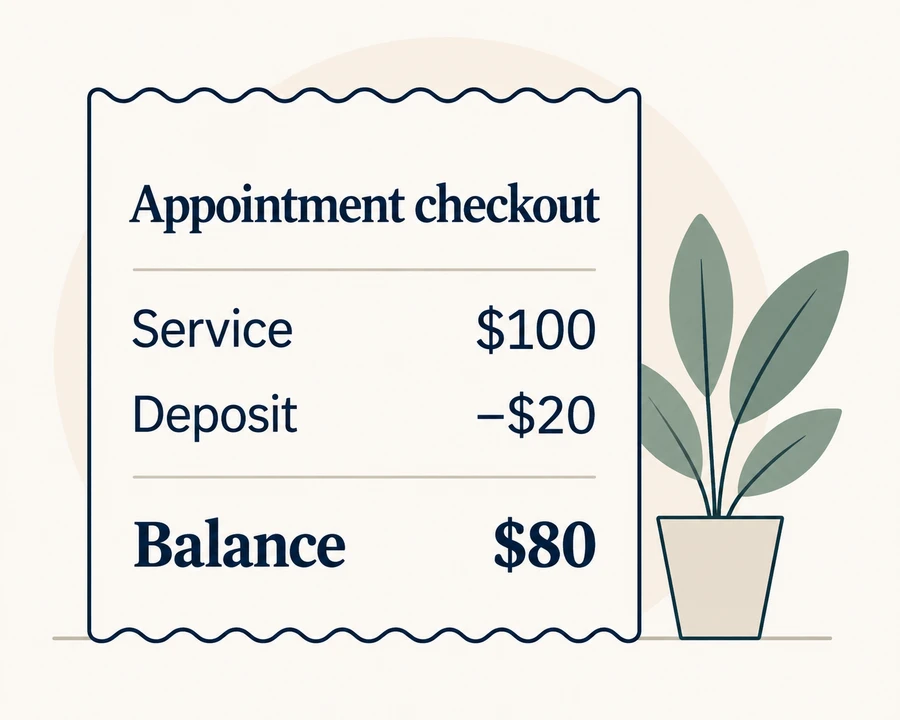
Keep the deposit and client record linked through checkout.
Where the schedules differ
- Apply color09:00–09:30
- Processing · free09:30–10:30
- Finish10:30–11:00
Occupied for the full appointment09:00–11:00
Explore the full appointment workflow
- Define the service and every stage
Record consultation, preparation, active work, processing, room or chair occupancy, equipment, cleanup, checkout, and any handoff. State whether staff can safely serve another customer during processing rather than assuming they can.
- Bind eligible staff and required resources
Check practitioner skill and location eligibility together with the exact room, chair, device, or interchangeable pool consumed during each interval.
- Create one booking identity
Give the appointment a stable identifier used by the customer view, staff schedule, resource allocation, deposit, notification, external calendar, checkout handoff, and client history.
- Keep money attached to the obligation
Separate service total, deposit, remaining balance, later payment, refund, discount, tax, tip, receipt, and settlement. This page delegates detailed money reconciliation to the payment guide.
- Handoff to checkout and client history
The staff-side checkout should receive the correct booking, customer, service, practitioner, deposit reference, and outstanding state without re-keying or matching by a mutable name.
- Reconcile changes and recovery
After a reschedule, reassignment, cancellation, no-show, service change, failed integration, duplicate client, or checkout correction, compare the booking and every dependent record before releasing capacity.
Follow the example through checkout
This invented salon day uses no real appointments or prices. Staff availability during processing depends on the service; release the chair only after any required cleanup.
- 09:00–09:30
- Synthetic client A. Practitioner active. Chair 1 occupied. $20 synthetic deposit linked.
- 09:30–10:30
- Processing interval. Availability follows the declared salon rule. Chair 1 remains occupied. Same booking obligation.
- 10:30–11:00
- Final service stage. Practitioner active. Chair 1 occupied. Checkout handoff prepared.
- 11:00
- Booking completed. Fulfillment history preserved. Chair released after declared cleanup. $80 synthetic pre-tax, pre-tip remainder.
- Checkout
- One client identity. Correct practitioner reference. Correct service reference. Deposit plus remainder reconciled.
- After checkout
- Operational history updated. Attribution preserved. Capacity available for the next valid interval. Receipt or settlement remains a separate record.
One appointment. Seven connected records.
Everyone can see an open slot and still be looking at different records. Keep the booking, capacity, payment, and client history tied to the same visit.
- Booking
- Owns lifecycle state, customer request, service, start/end, location, and the stable appointment identity.
What can go wrong?
A copied calendar event or checkout sale becomes a second appointment with no reliable relationship.
- Practitioner allocation
- Owns eligibility and the exact active or reserved intervals for the assigned practitioner.
What can go wrong?
Processing time silently frees or blocks staff under the wrong business rule.
- Chair, room, and equipment
- Owns named or pooled physical capacity for every required interval and service stage.
What can go wrong?
The employee appears available while the required room, chair, or device is already consumed.
- Service-stage plan
- Owns duration, preparation, processing, handoff, cleanup, and which actor or resource remains occupied.
What can go wrong?
A single duration hides different staff and resource intervals and permits an impossible overlap.
- Customer obligation and payments
- Owns the service obligation and links deposits, later payments, refunds, and the displayed remaining balance.
What can go wrong?
The deposit exists online but checkout charges the full amount or refunds the wrong booking.
- Checkout or POS handoff
- Owns the staff-side sale or settlement state and points back to the booking and payment references.
What can go wrong?
Staff re-key the service or customer and create an untraceable second money record.
- Client history
- Owns the permitted operational history while preserving one client identity and explicit merge or correction decisions.
What can go wrong?
Duplicate profiles split appointments, deposits, packages, notes, preferences, or communication history.
When the appointment changes
The appointment is rescheduled
Move every occupied interval
Recheck practitioner, room or chair, equipment, processing stages, deposit link, reminders, calendars, checkout handoff, and old-slot release.
The practitioner changes
Recheck eligibility and attribution
Verify service skill, location, active stages, resource access, customer communication, checkout attribution, and any separately governed compensation state.
The room, chair, or equipment changes
Move the allocation without changing the booking identity
Preserve the appointment and customer state while releasing the old unit and blocking the new one for the exact required intervals.
The service or duration changes
Rebuild stages and the obligation
Recalculate staff and resource occupancy, availability, displayed duration, deposit or balance assumptions, checkout handoff, and customer confirmation.
The booking is cancelled or marked no-show
Release capacity and apply the declared money policy
Keep cancellation, attendance, deposit, refund, credit, receipt, messages, calendar, client history, and audit records distinct and explainable.
A client profile is merged or corrected
Preserve booking and money relationships
Use an explicit merge or correction path with permissions, audit history, duplicate review, communication ownership, and applicable retention or deletion rules.
The complete consistency rule
A practitioner may be free while the required room is not. A processing stage may release staff without releasing a chair. An online deposit may exist without appearing at checkout. A reschedule can move the calendar while leaving the client note, reminder, or payment attached to the old state.
Consistent salon appointment = one booking identity + eligible service and staff + complete occupancy stages + linked money state + checkout handoff + one client history + recoverable changes
Choose who owns each part of the booking.
One application or connected tools can both work. The important part is knowing which system owns each record and how changes reach the others.
One integrated operating stack
Booking, staff, resources, checkout, and client history share one maintained application boundary.
What to check
Verify that the shared interface also preserves distinct records, permissions, exports, and recovery states.
Watch for: One logo does not prove every module shares the same booking identity or reconciles every change.
Booking system plus connected checkout
The booking system owns appointments; the checkout system receives a stable booking and customer reference.
What to check
Define payment ownership, identifiers, handoff direction, retry, duplicate protection, correction, refund, and reconciliation.
Watch for: Matching by customer name, phone, or service label can attach a sale or deposit to the wrong visit.
Booking system plus client-record system
Appointments remain authoritative in booking while a separate system holds approved client history.
What to check
Specify field ownership, permitted data, identity matching, edit direction, merge handling, deletion, export, and failed-update recovery.
Watch for: Two editable customer profiles can overwrite each other or split the history without a clear system of record.
Bounded modular stack
Booking, checkout, client history, messages, and accounting are separate but connected through explicit contracts.
What to check
Give every link an owner, stable IDs, least data, idempotent retries, monitoring, reconciliation, security review, and removal path.
Watch for: A flexible stack can create more manual work and failure surfaces than an integrated route when ownership is weak.
Warning signs in a software demo
The demo books only the practitioner
The chair, room, device, processing interval, cleanup, location, or shared capacity never faces a conflict.
The deposit is shown only on the customer receipt
Staff checkout never proves that the same payment reference reduces the correct booking obligation.
Processing time always frees the practitioner
The system applies a generic rule instead of the salon's declared service-stage and supervision model.
Client records match by a mutable label
A changed name, phone, email, or spelling can create a duplicate or attach history to the wrong person.
A reschedule moves only the calendar block
Old resource capacity, reminders, deposit, checkout handoff, or client history remains attached to the previous state.
Try a sample appointment before choosing
Use one invented client, service, practitioner, chair, deposit, checkout, and client record. Then change one state at a time and compare every dependent record.
- Write the full stage plan with active staff time, processing, room or chair occupancy, equipment, cleanup, customer presence, and checkout.
- Create the synthetic booking, reschedule it, reassign staff and resource, complete checkout, cancel a second copy, and inspect booking IDs, allocations, payment links, balances, messages, calendars, and client history.
- Repeat any failed handoff, record duplicates or stale states, reconcile the source of truth, and document the owner, limitation, recovery, and exit path.