 Booking Handbook
Change a booking without losing track.
First checks
- Publish the policy in plain language
Define eligible actors, cancel and reschedule windows, time zone, fees or value outcomes, exception path, and what the customer sees before booking and before confirming a change.
- Authenticate the request
Use a secure, expiring, booking-specific path and a confirmation step. Link previews, email scanners, and simple page loads must remain read-only.
- Evaluate time and authority
Calculate the cutoff from the appointment start in the declared time zone, distinguish customer from staff or business action, and require a reason for any override.
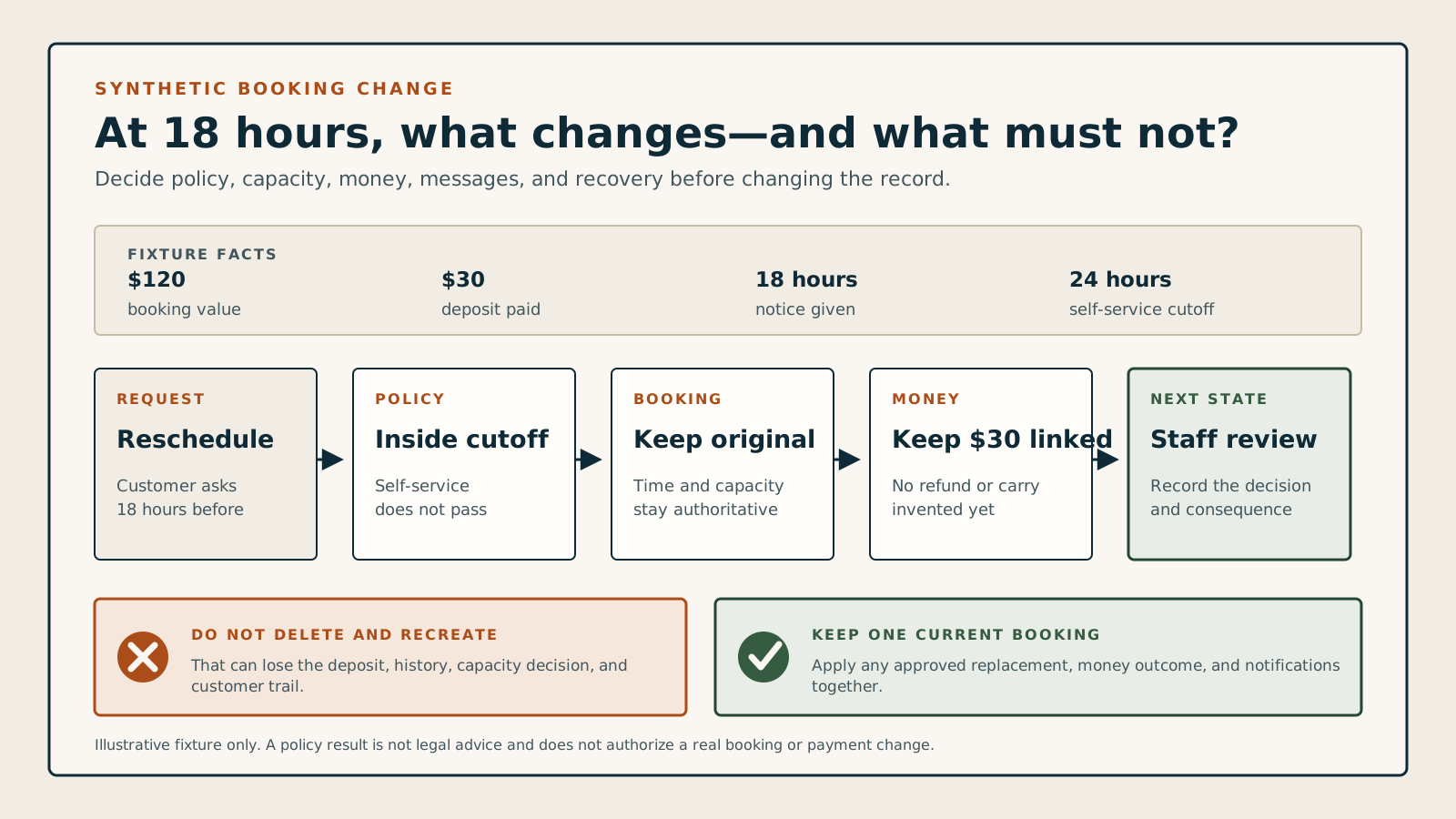
Can this cancellation or reschedule proceed safely?
Set the action, actor, time before start, customer cutoff and exact-boundary rule, payment state, value outcome, and any staff override. The checker returns the booking, availability, money, message, calendar, audit, and recovery work that must stay together.
Keep the original booking
Block customer self-service because the request is 18 hours before start and the configured cutoff is 24 hours. Keep the original booking intact and offer a staffed recovery path.
Do not cancel, move, or replace the original booking from this denied self-service request.
Do not release the original time or hold a replacement slot.
Do not automatically refund, retain, credit, or collect money from a blocked request.
Show the cutoff, the booking's current state, and a staffed contact path for an exception request.
Log the request time, policy version, cutoff calculation, actor, and result without changing the booking.
Understand the safe-change rule
State the rule first
Name who can cancel or move, until when, in which time zone, and what exceptions require staff.
Confirm before changing
Opening an email link or a security preview must not cancel an appointment by itself.
Move capacity safely
For a reschedule, secure the replacement before releasing the original time and resources.
Reconcile every outcome
Booking, money, messages, calendars, and history must agree—or show a clear recovery state.
The customer needs to know whether the original booking still exists.
A broken self-service link, last-minute cutoff, failed replacement slot, duplicate message, delayed refund, or stale external calendar can leave the customer thinking one thing and staff seeing another. A safe system evaluates the policy, applies the change once, and returns an itemized final state.
The safe-change rule: Safe change = authenticated request + policy decision + atomic booking update + reconciled dependencies + clear recovery
A customer asks to reschedule 18 hours before an appointment under a 24-hour self-service cutoff. The system should keep the original booking intact, explain the limit, and offer a staffed exception path—not partly release the slot or silently create a second booking.
Follow the complete booking-change sequence
A policy result, capacity swap, money consequence, customer receipt, calendar update, and recovery path belong to one change. If any dependency fails, the booking must still have one understandable current state.
- Publish the policy in plain language
Define eligible actors, cancel and reschedule windows, time zone, fees or value outcomes, exception path, and what the customer sees before booking and before confirming a change.
- Authenticate the request
Use a secure, expiring, booking-specific path and a confirmation step. Link previews, email scanners, and simple page loads must remain read-only.
- Evaluate time and authority
Calculate the cutoff from the appointment start in the declared time zone, distinguish customer from staff or business action, and require a reason for any override.
- Prepare the complete change
For rescheduling, validate and briefly hold the replacement staff, time, location, and resources before releasing the original booking.
- Apply one recoverable transaction
Update booking, capacity, money outcome, customer history, calendars, messages, and integrations once, with safe retries and explicit partial-failure handling.
- Return the final state
Show whether the request succeeded, was blocked, needs review, or used an override; include old and new details, money result, messages, and a direct recovery path.
Compare the five booking-change models
Separate customer actions, staff exceptions, and business changes. The same button label can hide different authority, cutoff, money, capacity, message, and recovery rules.
Customer self-service cancellation
Example: a customer opens a secure link, reviews the consequence, and confirms cancellation before the cutoff.
- Rule
- Keep the page read-only until explicit confirmation, then cancel once and return a durable receipt.
- Watch for
- Email previews, scanners, forwarded links, or repeated clicks can trigger an unintended or duplicate cancellation when a link itself performs the action.
Customer self-service reschedule
Example: the customer chooses a replacement time while the original appointment is still protected.
- Rule
- Validate and hold the replacement, then swap capacity and preserve one linked booking history.
- Watch for
- Releasing the original first can leave the customer with neither appointment; creating the new booking first can briefly double reserve capacity or value.
Staff exception or override
Example: an employee accepts a late change for an emergency after reviewing the policy consequence.
- Rule
- Require the staff identity, reason, affected policy, customer-visible result, and dependent money and availability outcomes.
- Watch for
- An unlabeled override makes rules inconsistent and removes the history needed to answer a complaint or train staff.
Business-initiated change
Example: staff absence requires the business to cancel or offer a replacement appointment.
- Rule
- Separate business action from customer action and provide an explicit rebooking, refund, credit, or review path.
- Watch for
- Applying customer penalties or notices to a business-initiated change can produce the wrong money state and misleading communication.
Manual approval path
Example: a collected deposit, unusual exception, or unavailable replacement requires a person to decide.
- Rule
- Keep the booking's current state visible, acknowledge the pending request, name the reviewer, and set a response target.
- Watch for
- A vague pending state can release capacity, stop reminders, or tell the customer the booking changed before any decision exists.
Review timing, capacity, and failure recovery
Security previews, cutoff boundaries, disappearing replacement slots, delayed money, failed messages, and repeated requests should not split the booking into conflicting records.
A link is opened by a preview or scanner
Read first; require confirmationA GET request, email preview, security scanner, or page load should show the proposed consequence without changing booking, money, capacity, or message state.
The request lands on the cutoff
Use one clock and one boundary ruleDeclare whether the exact cutoff is allowed, calculate in the appointment's named time zone, and test daylight-saving and locale boundaries.
The replacement becomes unavailable
Keep the original until the swap is safeExpire the failed hold, preserve or clearly restore the original booking, and return alternatives without creating a duplicate or orphan.
Money processing fails or is delayed
Show booking and payment states separatelyDo not describe a refund, charge, or credit as complete until its actual state is known; route uncertainty for reconciliation.
A message or calendar update fails
Retry the dependency, not the booking changeKeep the final booking state stable, make retries idempotent, and show staff which customer, calendar, or integration update needs recovery.
The request repeats or overlaps
Apply one change and return the same resultRepeated clicks, callbacks, or simultaneous staff and customer actions should not create duplicate cancellations, appointments, refunds, or notifications.
Look for warning signs in a software demo
Test the change when one dependency fails. Watch the original booking, replacement hold, staff schedule, resources, money, customer receipt, notifications, external calendars, and audit history.
Use a 24-hour cutoff, an 18-hour customer request, and one documented override.
A cancellation policy field or reschedule button proves little. Force the same boundary, failure, and recovery events in every shortlisted system and inspect every dependent record.
- Create a synthetic paid or deposit-backed appointment, publish a 24-hour customer cutoff, and attempt cancellation and rescheduling 30 hours, exactly 24 hours, and 18 hours before start.
- At 18 hours, confirm the original stays intact, then apply one staff override with a reason and inspect availability, money, messages, calendars, and history.
- Repeat a request, expire a replacement hold, and simulate one message or payment uncertainty; record whether the final state and recovery queue remain understandable.
Keep the test fair
- Use synthetic customers, staff, bookings, payment methods, and communication addresses in an authorized test environment.
- Record the exact plan, policy version, time zone, cutoff boundary, actor, override reason, payment state, and value outcome.
- Treat this checker and documentation as preparation, not evidence that a product applies the policy correctly or that the policy is lawful or fair.