 Booking Handbook
When booking messages go missing.
First checks
- Define the message's job
Name the audience, purpose, trigger, schedule, time zone, channels, required response, escalation window, consent basis, and stop conditions before writing the template.
- Schedule from the current booking
Create occurrence-specific jobs with stable booking and recipient references; recalculate or suppress them when time, service, staff, place, status, or contact details change.
- Render complete current details
Include the correct local date, time, time zone, service, place or meeting path, provider where appropriate, booking reference, and safe confirm, cancel, or reschedule route.
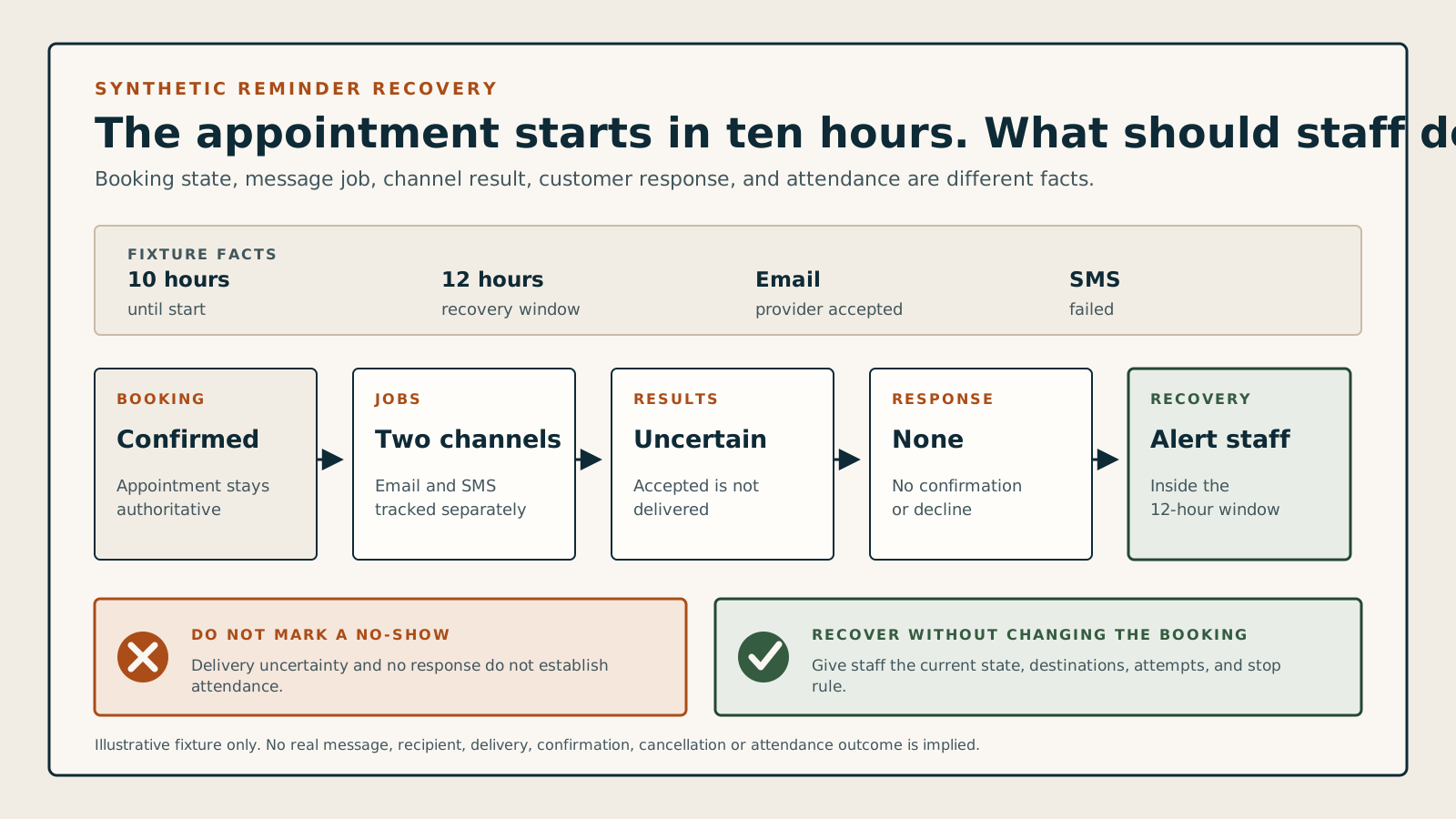
What can the team safely conclude from these message states?
Choose the booking state, time until start, recovery window, confirmation rule, customer response, and separate email and SMS results. The checker shows whether to stop, monitor, recover, record attendance, or continue with a clear boundary.
Staff recovery is required
No required response is recorded with 10 hours until start. Alert staff under the 12-hour recovery rule and keep the booking state explicit.
Keep the booking state independent from message delivery and customer response.
Preserve the message job, provider reference, attempt times, and latest channel result.
Preserve this channel's own job and result; do not copy the email state across.
The response deadline is near; trigger the documented staff recovery path without silently cancelling the booking.
Record attended, late, or no-show only from the service's attendance workflow after the appointment.
Understand the communication rule
Start from booking state
Only current upcoming bookings should create future reminder work.
Track every channel
Email and SMS need separate jobs, provider references, attempts, and outcomes.
Separate response from delivery
A delivered reminder is not confirmation; confirmation is not attendance.
Recover before guessing
Failed or unknown communication should create staff work, not a silent cancellation or no-show.
A green notification status can still hide an uninformed customer.
A provider may accept an email that later bounces, an SMS may show the wrong time, one of two bookings may miss its reminder, or a customer may receive dozens of duplicates. The booking should remain authoritative while each communication attempt and response keeps its own traceable state.
The communication rule: Reliable communication = current booking + scheduled job + channel result + customer response + staff recovery + attendance record
A confirmed appointment starts in ten hours. Email is provider-accepted, SMS failed, and the customer has not answered a required confirmation request. Under a 12-hour recovery rule, staff should be alerted; the booking should not silently become cancelled or no-show.
Follow the complete booking-communication sequence
Messages follow the current booking; they do not replace it. Each attempt and response needs a durable state so staff can recover uncertainty without guessing or duplicating what already worked.
- Define the message's job
Name the audience, purpose, trigger, schedule, time zone, channels, required response, escalation window, consent basis, and stop conditions before writing the template.
- Schedule from the current booking
Create occurrence-specific jobs with stable booking and recipient references; recalculate or suppress them when time, service, staff, place, status, or contact details change.
- Render complete current details
Include the correct local date, time, time zone, service, place or meeting path, provider where appropriate, booking reference, and safe confirm, cancel, or reschedule route.
- Send idempotently
Give each channel job and attempt an identity so retries, workers, callbacks, and repeated events cannot produce duplicate messages.
- Interpret channel and response states
Keep scheduled, provider-accepted, delivered, bounced, failed, unknown, confirmed, declined, and no-response states separate and time stamped.
- Recover and record attendance
Alert staff before start when delivery or response fails, then record attended, late, or no-show from the attendance workflow—not from communication state.
Compare the five communication models
Receipts, reminders, confirmation requests, staff alerts, and attendance follow-up belong to different moments and cannot share one vague notification state.
Immediate booking receipt
Example: the customer and staff receive the newly created booking details and reference.
- Rule
- Trigger once from successful booking creation and state whether the booking is pending or confirmed.
- Watch for
- Calling a pending request confirmed can make the customer arrive for a slot staff never accepted.
Scheduled reminder
Example: send 24 hours and two hours before the current appointment start.
- Rule
- Attach each reminder to the current occurrence and recalculate after changes; suppress it after cancellation or completion.
- Watch for
- A stale job can send the old time, wrong provider, cancelled appointment, or duplicate reminder after a reschedule.
Confirmation request
Example: ask the customer to confirm by a declared deadline before staff intervene.
- Rule
- Store response and deadline separately, explain the consequence in advance, and require an explicit action rather than link preview side effects.
- Watch for
- No response does not automatically prove cancellation, non-delivery, or future non-attendance.
Staff operational alert
Example: notify staff when all channels fail or a required response is missing near start.
- Rule
- Create one assigned recovery item with booking, contact, channel evidence, timing, and approved alternatives.
- Watch for
- Another blind automated retry can create duplicates, contact the wrong person, or repeat a channel that already worked.
Attendance and no-show follow-up
Example: staff records attended, late, or no-show after the service's defined grace period.
- Rule
- Base attendance on the operational record and preserve any later fee, refund, credit, follow-up, or correction as separate events.
- Watch for
- Confirmation, message delivery, calendar presence, or lack of response cannot by itself classify attendance.
Put your own numbers around the current no-show pattern.
Use your records and cost assumptions to separate missed contribution from staff recovery time. Then explore one hypothetical reduction without treating it as a forecast.
Start with your records
Enter all five values to calculate your current pattern and one hypothetical scenario.
- Missed contribution and recovery labor are shown separately because adding them can double count staff cost already included in your contribution figure.
- Annualized missed contribution is twelve times the monthly pattern, not a prediction of seasonality, growth, or future attendance.
- Prevented no-shows may be fractional because this is an average planning scenario, not a count of real people.
Review booking, contact, and delivery changes
Move or suppress stale jobs, keep each attempt traceable, retry one logical message safely, and route missing delivery or response into a staffed recovery path.
The booking is moved or cancelled
Recalculate or suppress future jobsKeep prior attempt history, stop stale jobs, generate only the messages required by the final booking state, and make retries safe.
Contact details or consent change
Use current approved destinationsValidate ownership, consent, opt-out, locale, and channel eligibility without rewriting where earlier attempts were actually sent.
Time, place, service, or provider changes
Render from the current occurrenceRegenerate affected content and action routes from authoritative booking data; do not reuse a stale message snapshot silently.
A worker or callback retries
Reuse the message identityRecord another attempt or provider update against the same job rather than creating a second logical reminder.
Delivery is bounced, failed, or unknown
Escalate with channel evidenceShow which channel failed, which succeeded, what remains unknown, and which approved recovery action staff should take before start.
The customer does not respond or declines
Follow the declared policy pathA decline enters cancellation or rescheduling; no response triggers the configured staff recovery rule without becoming an automatic no-show.
Look for warning signs in a software demo
Make one channel fail and the booking change. Watch the booking state, channel jobs, provider results, customer response, staff recovery queue, duplicates, stale content, and final attendance record.
Use a confirmed appointment, two channels, and a 12-hour recovery rule.
A reminder toggle or template editor proves little. Force delivery uncertainty, booking changes, response deadlines, duplicates, and attendance recording in the same synthetic scenario.
- Create a synthetic confirmed appointment 36 hours ahead with one immediate receipt, 24-hour and two-hour reminders, and separate email and SMS destinations.
- Make email provider-accepted without delivery proof and SMS fail; at ten hours with no required response, inspect the staff alert while confirming the booking remains explicit.
- Reschedule, cancel, retry one job, and pass the start time; inspect stale-job suppression, duplicates, customer and staff views, channel history, and the separate attendance record.
Keep the test fair
- Use synthetic customers, staff, contact destinations, bookings, and message content in an explicitly authorized test environment.
- Record the exact plan, time zone, booking state, trigger, schedule, template version, recipient, channel provider, message/job IDs, attempts, and response rule.
- Treat this checker and documentation as preparation, not proof of delivery, consent, compliance, attendance, reduced no-shows, or product behavior.