 Booking Handbook
When your booking and calendar show different times.
First checks
Start with these three useful checks, then use the checker if the records still disagree.
- Compare the booking and calendar times
Check the current time in the booking record, then inspect the linked calendar event.
- Confirm which direction should update
A booking export and an external busy-time block are different promises. Confirm which one you are testing.
- Allow time for the update
Wait through the provider's stated sync delay. If the records still disagree, save their current details before retrying.
An illustrated example
A booking moves from 10:00 AM to 2:00 PM. Fifteen minutes later, the external calendar still shows 10:00 AM even though the declared sync window is five minutes. The booking remains authoritative, but the linked event is stale and requires reconciliation.
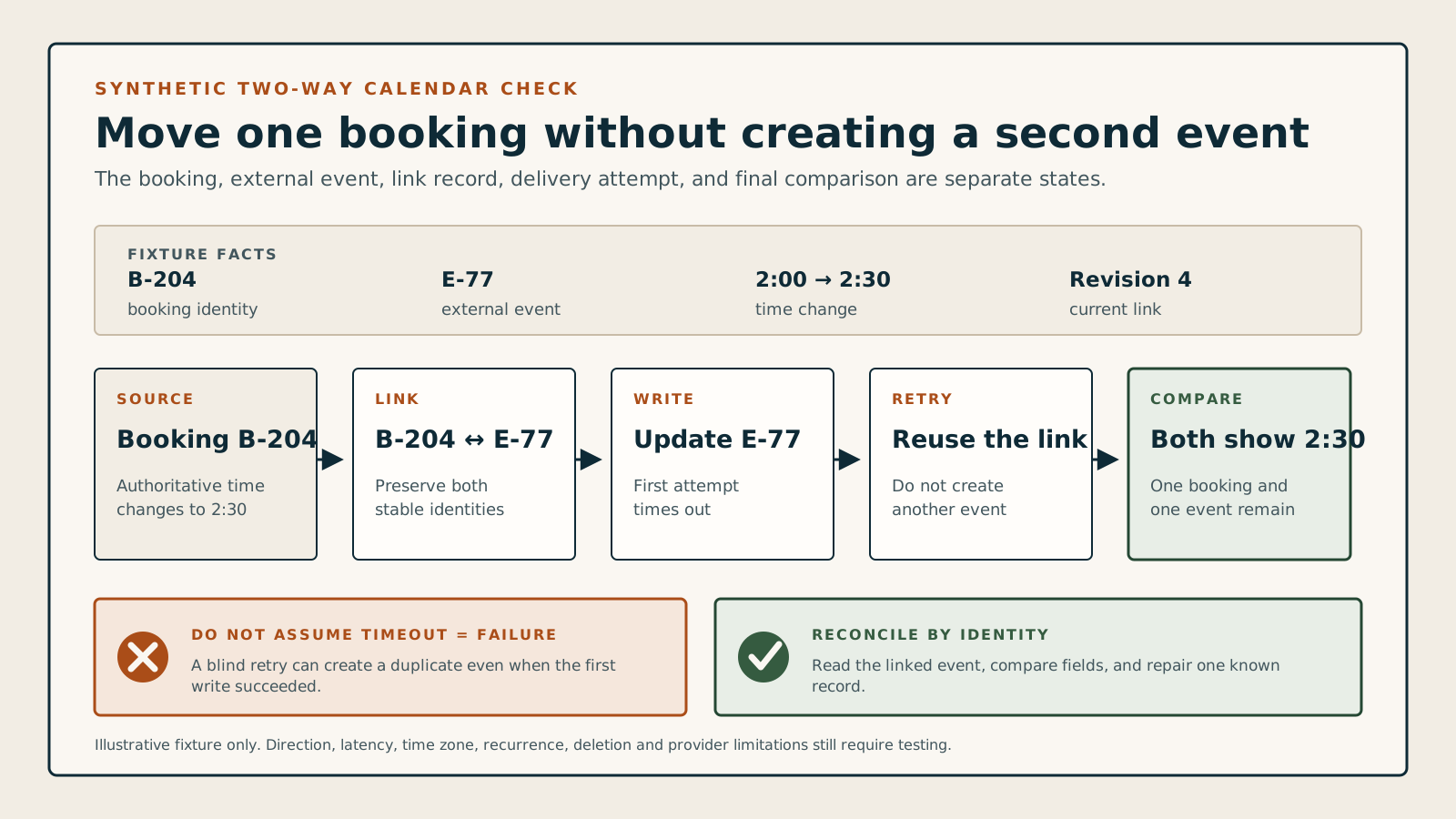
What changed, and what do you see?
Describe one update. Check the result before retrying or changing availability.
The linked event needs recovery
The external calendar still shows the old booking state or time. The 5-minute window has passed, so reconcile the existing link instead of assuming another retry will be safe.
Keep booking state in the booking system; an external event is a linked operational copy, not the booking itself.
Preserve the current observation, event identifiers, last successful update, provider response, and retry history before repairing the link.
Check whether the affected interval is offered, blocked, pending, or held; a visible calendar event alone is not proof.
Match immutable record identifiers and direction; do not infer identity from titles, customer names, or mutable descriptions.
Retry idempotently or route to staff; do not create a fresh event blindly or erase the booking's authoritative history.
Record source and destination timestamps at fixed checkpoints; this checker does not create hands-on product evidence.
More detail when you need it
The checker handles the immediate observation. Open these sections to define the model, workflow, change rules, or controlled test in more detail.
Calendar direction, latency, and recovery
How two-way calendar sync should prevent conflicts and recover stale events
Know which direction should change, how long it may take, and what to inspect when the two systems disagree.
Adding appointments to a calendar is not the same as using external busy time to block customer availability. A dependable integration declares each direction, links records safely, handles time zones, and exposes delayed, duplicate, missing, or stale events for recovery.
Name the direction
Separate booking-to-calendar export from calendar-to-availability conflict blocking.
Link records
Keep the booking, external event, calendar, account, and sync attempt traceable.
Bound the delay
Measure create, edit, and cancel propagation against a declared latency window.
Recover disagreement
Reconcile missing, stale, and duplicate events after disconnects, retries, and reconnects.
A visible event can still leave the appointment bookable elsewhere.
One-way export can make a staff calendar easier to read while doing nothing to block an external meeting from the booking page. Even a two-way connection can lag, lose its event link, keep an old time after rescheduling, or leave a cancelled event behind.
The synchronization rule: Reliable calendar and video handoff = declared direction + current booking + external busy state + stable event link + current meeting state when required + bounded latency + recovery log
This guide covers operational calendar synchronization and the required video-link lifecycle. The booking, external event, and meeting remain distinct records; recurring-series scope belongs to its own guide; staff, room, and equipment conflicts need the wider availability model; notification delivery, recording, privacy, security, consent, retention, and legal conclusions need their own rules or qualified review.
Follow the complete six-step synchronization workflow
- Declare each direction
State whether the connection exports bookings, imports external busy time, does both, or only supplies a subscription feed. Name which calendars, staff, services, and event states participate.
- Choose the authoritative records
Keep the booking system responsible for booking state and the external calendar responsible for its own busy events. Store stable links rather than matching mutable titles or customer names.
- Normalize time before comparing
Preserve the source time zone, exact start and end instants, all-day semantics, daylight-saving behavior, and the display zone used by staff and customers.
- Propagate changes idempotently
Create, reschedule, cancel, retry, and callback paths should update one logical link. Repeated delivery must not create a second event or revive an old one.
- Measure a bounded latency window
Record when the source changed and check the destination at fixed intervals. Until the stated window passes, show the state as pending rather than silently claiming success.
- Reconcile and recover
After errors, disconnects, or reconnects, identify missing, stale, orphaned, and duplicate links; preserve history; and route unresolved conflicts to staff before offering the time again.
Compare the five calendar connection models
One-way booking export
Example: confirmed appointments appear on the staff member's external calendar.
- Rule
- Test booking create, reschedule, and cancel propagation; do not expect an unrelated external meeting to block the booking page.
- Watch for
- A successful export is often described loosely as calendar sync even though no busy time returns to availability.
Inbound busy-time blocking
Example: an external meeting removes overlapping customer slots without creating booking records.
- Rule
- Import only eligible busy states and re-open availability when the event moves, becomes free, is deleted, or leaves the connected calendar.
- Watch for
- Copying every event into the booking system can expose private details or confuse busy time with a customer appointment.
Two-way linked synchronization
Example: bookings export outward and eligible external busy events block new bookings inward.
- Rule
- Keep direction-specific links, retries, latency, and conflict behavior observable while preventing feedback loops.
- Watch for
- Two-way does not mean every field can be edited safely from either side or that both systems share one record.
Calendar subscription feed
Example: staff subscribe to a read-only booking feed that their calendar refreshes periodically.
- Rule
- Treat refresh timing and direction as limitations; publish neither instant propagation nor inbound conflict protection unless separately provided.
- Watch for
- The receiving calendar may control refresh frequency, so a correct feed can still look stale for longer than an API-based connection.
Video meeting provisioning
Example: a separate integration creates a meeting link and places it on the booking and calendar event.
- Rule
- Track meeting creation, permissions, host, link updates, cancellation, and failure separately from calendar availability synchronization.
- Watch for
- A calendar event can synchronize while its Zoom, Meet, or Teams link is missing, stale, duplicated, or assigned to the wrong host.
Check the full video-link lifecycle
- 01. Decide whether this booking needs a meeting
Requirement: Keep in-person, phone, and video delivery explicit. Do not generate a meeting merely because a calendar connection exists.
- 02. Choose the permitted host and meeting type
Eligibility: Confirm the assigned provider can host the selected meeting type and preserve the host identity, permissions, and plan-dependent limitation as separate inputs.
- 03. Wait for one meeting result
Pending: Meeting creation may complete after the booking or event request. Keep the handoff pending until one meeting ID and current join details exist; do not send an empty or guessed link.
- 04. Link booking, event, meeting, host, and customer handoff
Current: The staff view, calendar event, customer confirmation, reminder handoff, and history should reference the same current meeting without exposing a host-only start credential.
- 05. Reconcile reschedule and reassignment
Changed: When time, provider, delivery mode, or meeting eligibility changes, declare whether the existing meeting updates or is replaced and make the previous customer link invalid or visibly superseded.
- 06. Cancel, retry, reconnect, and audit
Stopped or recovered: A cancellation or disconnect must not leave an unexplained active meeting. Retry idempotently, reconcile missing, stale, duplicate, and wrong-host states, and preserve the reason and final linkage.
Review changes that can leave records out of step
A booking is created
Create one linked external eventConfirm the correct calendar, staff owner, start, end, time zone, busy state, privacy level, and stable link without producing duplicates on retry.
A booking is rescheduled
Move the linked eventUpdate the existing link to the new instant and verify the old interval is released; do not leave both old and new events behind.
A booking is cancelled
Apply the declared cancel behaviorDelete, mark cancelled, or free the linked event according to the documented model while preserving the booking and sync audit history.
An external busy event changes
Recalculate customer availabilityBlock, move, or release only the affected interval and recheck buffers, resources, location, travel, and any existing holds before exposing slots.
The connection stops or reconnects
Reconcile from a saved checkpointShow the disconnected period, avoid assuming nothing changed, scan both directions from a durable cursor, and surface unresolved or permission-blocked records.
A time zone or daylight rule changes
Compare exact instants and display zonesRe-render without silently shifting the appointment, duplicating an ambiguous local time, or treating an all-day event as a timed appointment.
The required video meeting changes
Reconcile host, meeting, event, and customer linkKeep creation pending until current join details exist; after a time, provider, or delivery-mode change, update or replace the meeting deliberately and retire stale customer links.
Look for six warning signs in a software demo
Two-way is never defined
The demo shows a booking on Google or Microsoft Calendar but never proves that an external busy event blocks customer availability.
No latency promise or pending state
The interface says synced without showing when the source changed, when the destination was checked, or how stale data is handled meanwhile.
Events are matched by title
Changing a subject, customer name, or staff label can break the link and produce a missing, duplicate, or orphaned calendar event.
Reconnect means start over
The system cannot explain which changes were missed, where its checkpoint lives, or how it prevents replay from duplicating old events.
One time-zone display is treated as proof
The test never compares source and destination instants across staff, business, customer, calendar, and daylight-saving boundaries.
The event is current but the meeting is not
The calendar looks correct while the join link is missing, still pending, stale after a move, duplicated, or assigned to the previous host.
Test one stale-event recovery
Use one synthetic booking, one external busy event, and a fixed five-minute window.
A connected badge proves very little. A fair trial checks both directions and forces the exact create, move, cancel, disconnect, reconnect, retry, and time-zone paths that can create a real conflict.
- In an explicitly authorized test environment, create a synthetic booking from 10:00 to 11:00 and verify one linked external event at zero, one, five, and fifteen minutes.
- Move the booking to 2:00 to 3:00, change the synthetic host, cancel it, then create an unrelated external busy event; inspect the old and new intervals, customer availability, event and meeting links, retries, and duplicates at every checkpoint.
- Disconnect, change one record on each side, reconnect, and inspect missed-change reconciliation, permissions, time zones, pending or stale video state, audit history, and the staff recovery path without using personal or client data.
Keep the test fair
- Use only dedicated synthetic staff, customer, calendar, booking, event, and meeting data after account, OAuth, invitation, and write/delete authorization is explicit.
- Record the exact provider, product, plan, direction, calendars, event and meeting states, host, time zones, permissions, identifiers, latency checkpoints, and every limitation.
- Treat this checker and documentation as preparation, not evidence that any named product synchronizes correctly, prevents double booking, or satisfies privacy, security, or legal requirements.
This planning aid does not connect an account, grant OAuth, read or write a calendar, verify a provider, prevent a real conflict, or prove security, privacy, plan entitlement, uptime, latency, or product behavior.