 Booking Handbook
Stop double booking shared resources.
First checks
- Staff is not inventory
A free employee does not prove that a required room or device is free.
- Name units or use a pool
Track unique resources differently from interchangeable quantities.
- Fit one real request
An unsplittable party must fit inside one available room.
- Protect every change
Creating, moving, resizing, and cancelling must update the correct holds.
Can one available unit or pool fulfil this request?
Enter the capacity of each unit, mark unavailable units by their position in the list, and choose whether the request must fit in one unit or may draw from an interchangeable pool.
This request fits
Use unit 3, the smallest available unit that safely fits the request.
- Capacity used or available
- 10
- Selected unit numbers
- 3
- Unused capacity
- 3
This planning aid does not reserve inventory, simulate two simultaneous saves, apply time intervals, or prove how any booking product behaves.
The appointment is only available when every required resource is available.
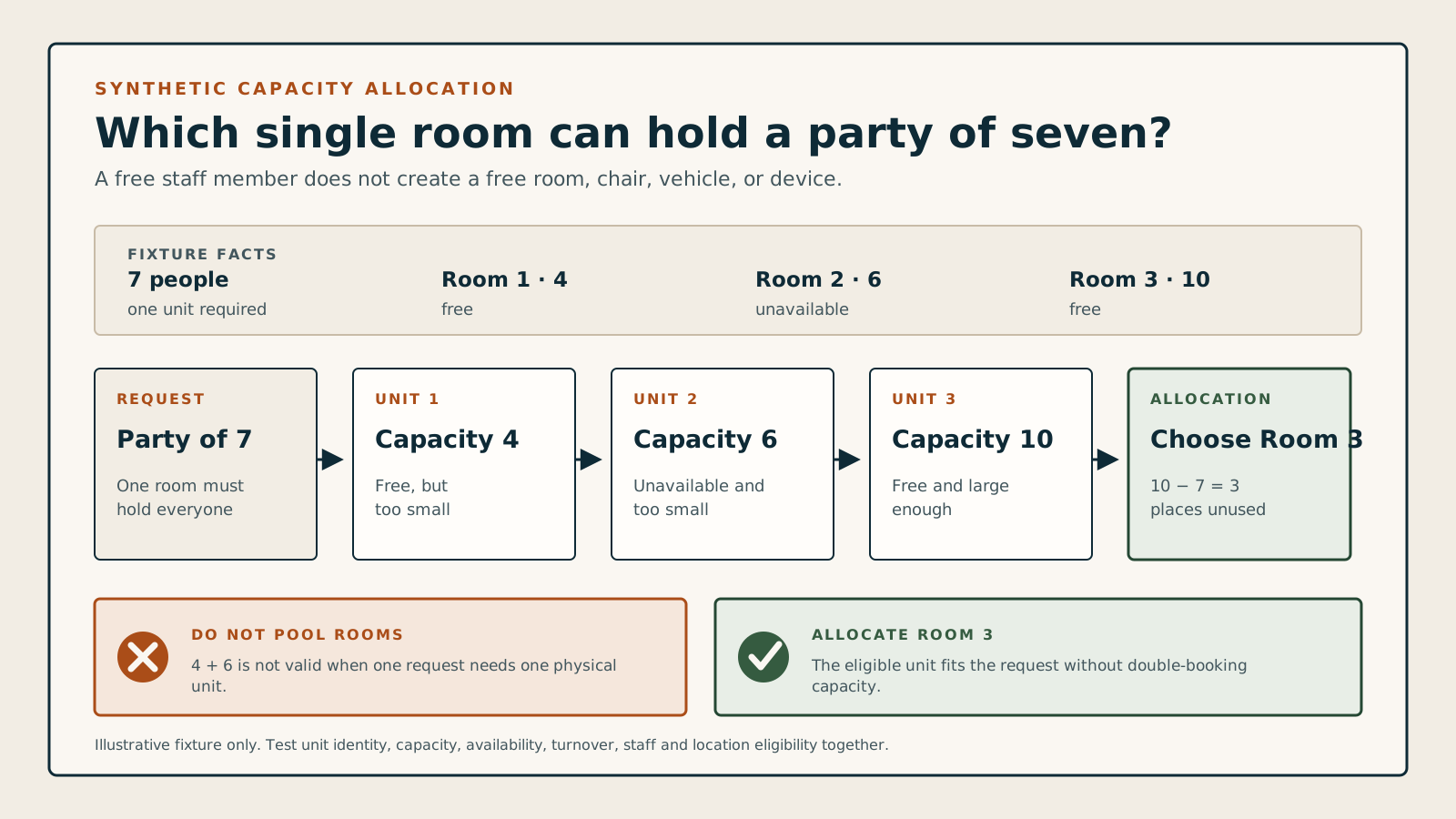
Suppose a business has rooms for 4, 6, and 10 people. A party of 7 cannot use the 4-person and 6-person rooms at the same time unless the service genuinely allows the party to split. It needs one available room that holds at least 7.
Safe booking = available staff + every required resource + enough capacity + one protected save
Rooms hold 4, 6, and 10. Room 2 is unavailable. A party of 7 fits only in room 3, so that exact room must be held with the reservation.
Compare the five resource models
An employee can be free while the room, chair, vehicle, device, or other resource required for the appointment is already occupied. Safe availability checks every constrained part of the booking together before offering the time.
Make sure every appointment has the space, equipment, and capacity it needs.
Named exclusive unit
Example: Treatment Room 2, Van 4, or a specific imaging device.
- Rule
- Reserve the exact unit for the full interval in which the appointment needs it.
- Common mistake
- Checking whether any similar unit exists without holding the one assigned to the booking.
Interchangeable pool
Example: eight identical tablets or twelve matching rental chairs.
- Rule
- Subtract the requested quantity from one shared pool and restore that quantity when the hold ends.
- Common mistake
- Treating unlike items as interchangeable merely because they share a category name.
Different-capacity units
Example: rooms that hold 4, 6, and 10 people.
- Rule
- Assign the smallest available single unit that safely fits an unsplittable request.
- Common mistake
- Adding separate room capacities together when the party cannot actually split between rooms.
Required bundle
Example: one employee, one room, and one device are all required for a procedure.
- Rule
- Confirm and hold every required part together or reject the booking without leaving a partial hold.
- Common mistake
- Saving the staff appointment first and discovering later that the room or equipment is missing.
Partial-time resource
Example: a preparation bay is needed for 15 minutes, while the treatment room is needed for the whole visit.
- Rule
- Give each resource its own occupancy interval, including setup and cleanup when those consume it.
- Common mistake
- Holding every resource for the full appointment or releasing one before the real work is finished.
Find the upper bound before real schedules reduce it.
Enter one same-day operating window, one repeated appointment footprint, and the number of staff and resource lanes that can truly operate at the same time. The result exposes the narrowest shared constraint.
Start with your operating limits
Enter the full operating window, appointment footprint, and concurrent staff and resource lanes.
Assumptions you must check
- Every appointment has the same duration and turnover footprint.
- Every counted staff and resource lane remains eligible and usable for the entire window.
- The planner uses the smaller concurrent lane count; spare staff cannot replace a missing room or required resource.
- The result is an upper bound before breaks, time off, existing bookings, travel, varied skills, staggered resources, customer preferences, or policy reduce availability.
This planner does not estimate demand, occupancy, utilization, revenue, staffing need, customer behavior, or real availability. It does not reserve capacity, optimize a schedule, handle overnight windows, prove a product, or recommend a purchase.
Use the allocation checker above to decide whether one request fits one unit or a real pool.
Use the classes and waitlists guide when several attendees share one occurrence.
Use the staff assignment guide when eligibility or customer choice differs by person.
Use the buffers and travel guide when real appointments, locations, or transitions are known.
Handle reservation changes and demo failures
Create
Hold the complete bundleConfirm staff, every required unit, quantities, capacity, and occupancy interval before the reservation becomes accepted.
Concurrent create
Protect the final available unitIf two people request the last room or device at once, only one save should succeed and the other should receive a clear conflict.
Reschedule
Protect the old booking firstTest and hold the proposed time before releasing the original resources, so a failed move does not lose a valid reservation.
Change party or service
Calculate the requirements againA larger party, longer service, or different procedure may require another room, capacity, device, quantity, or occupancy interval.
Cancel, reject, or expire
Release only owned holdsReturn the exact units and quantities held by this booking without freeing resources that another appointment still uses.
Maintenance or closure
Find affected future reservationsTaking a room or device offline should identify existing bookings that now need reassignment, contact, or another decision.
Availability checks staff only
The booking page offers a time because the employee is free even though a required room or device is occupied.
Unlike resources share one pool
Different room types, device capabilities, or accessibility requirements are counted as if every unit can fulfil every request.
Separate rooms are added together
The system accepts a party using combined capacity even when the appointment must take place in one room.
The final unit can be sold twice
Two simultaneous customer or administrator requests can both confirm the last available unit or quantity.
Changes leave ghost holds
Cancelling or moving a booking makes it disappear from the calendar but its old room, device, or quantity remains unavailable.
Use three rooms, a small equipment pool, and one difficult change.
Feature names such as resource management or capacity control are not enough. Give every shortlisted product the same inventory and make it handle an ordinary conflict from start to finish.
- Create rooms for 4, 6, and 10 people plus a two-device pool, then mark one device unavailable.
- Create a service that requires one suitable room and one device, then submit a competing request for the final valid combination.
- Increase the party size, move the reservation, and cancel it while checking which holds remain and which are released.