 Booking Handbook
Can you take your booking data with you?
First checks
- Define the portable record inventory
List customers, contacts, bookings, recurring links, classes and attendees, services, staff, locations, resources, prices, taxes, discounts, tips, payments, refunds, credits, notes, forms, consents, messages, files, statuses, and audit history that must survive.
- Set scope, cutoff, and ownership
Declare active and historical ranges, cancelled and deleted states, time zones, late-arriving changes, who may export, where files may be stored, and when the final source-of-truth snapshot will occur.
- Export structure and meaning together
Preserve original stable IDs, foreign keys, field names, data types, status definitions, currency and minor units, exact instants, zone labels, encoding, delimiters, null values, attachments, and documented omissions.
Is this package a report, an incomplete download, or ready for migration rehearsal?
Describe the package, customer and booking scope, identifiers, relationships, time fields, money fields, custom fields, and reconciliation state. The checker identifies the next safe step without receiving or storing a file.
Reconcile the package before migration
The package appears structurally promising, but it cannot advance until source, files, and a controlled destination rehearsal reconcile.
Preserve customer IDs, current fields, approved history, duplicates, merged records, consent fields, and documented exclusions.
Preserve future and historical states, recurrence and attendee links, changes, cancellations, attendance, and the declared snapshot cutoff.
Keep stable primary and foreign keys so customers, bookings, services, staff, locations, payments, forms, and notes can be joined.
Keep exact instants plus the source zone or offset and status timestamps; avoid guessing from formatted local text.
Keep currency, minor units, obligation, payment, refund, dispute, tax, tip, discount, gateway, and receipt references where in scope.
Keep field identity, label, type, option meaning, required state, locale, version, answer, and record relationship where used.
Validate files, counts, unique IDs, relationships, edge-case records, rejected rows, transformed values, and destination results before acceptance.
Understand the portability rule
Inventory every record
Include customers, bookings, services, staff, locations, money, notes, forms, and history that the business must retain.
Preserve relationships
Keep stable IDs and links so one customer, booking, payment, service, and staff record can be joined correctly.
Keep time and status meaning
Export exact instants, zones, lifecycle states, cancellations, attendance, and change history without guessing.
Rehearse before switching
Validate files, map fields, import synthetic data, reconcile counts and samples, and keep a rollback path.
Rows are not enough when the relationships carry the meaning.
A customer name can appear in many bookings, a deposit can be separate from the final charge, a custom field can exist only on an intake form, and a local date can shift without its time zone. If the export removes stable keys or history, the destination cannot reliably rebuild the business record.
The portability rule: Portable booking data = complete scope + stable identifiers + preserved relationships + time and money meaning + documented format + reconciled samples
An export contains 240 upcoming appointments and customer names, but no customer IDs, cancelled history, time-zone fields, payment references, or custom intake answers. It is a useful schedule report, not a complete migration package.
Choose the right export purpose
A report, a same-product backup, and a cross-product migration package solve different problems. Start with the purpose and do not claim more than the file can rebuild.
I only need a booking or customer list
Find the exact export action, select the intended date and status filters, record when and in which time zone the file was generated, and check the columns before relying on it.
- Where this leads
- A readable CSV may answer today's reporting need. Label it as a report unless its scope and relationships support more.
I may switch booking systems
Start with the records the new system must rebuild, then require stable IDs, relationships, histories, time and money meaning, custom fields, files, configuration, omissions, and a repeatable map.
- Where this leads
- Use the checker and the synthetic rehearsal before choosing a destination or closing the source.
I cannot tell what the export includes
Treat the package as unknown. Ask for a field dictionary, filters, history coverage, stable IDs, related files, plan and role limits, pagination behavior, and documented exclusions.
- Where this leads
- Do not fill missing scope with assumptions or treat a successful download as evidence of completeness.
Follow the complete export and migration sequence
The source package, untouched archive, transformation, destination import, reconciliation, rollback, and later source-disposal decision are separate controlled stages.
- Define the portable record inventory
List customers, contacts, bookings, recurring links, classes and attendees, services, staff, locations, resources, prices, taxes, discounts, tips, payments, refunds, credits, notes, forms, consents, messages, files, statuses, and audit history that must survive.
- Set scope, cutoff, and ownership
Declare active and historical ranges, cancelled and deleted states, time zones, late-arriving changes, who may export, where files may be stored, and when the final source-of-truth snapshot will occur.
- Export structure and meaning together
Preserve original stable IDs, foreign keys, field names, data types, status definitions, currency and minor units, exact instants, zone labels, encoding, delimiters, null values, attachments, and documented omissions.
- Validate before transforming
Open copies in a safe environment, verify files and encoding, compare row and relationship counts, test duplicate IDs and required fields, scan a fixed set of edge cases, and hash the untouched originals.
- Map without erasing provenance
Create an explicit source-to-destination field map, preserve source IDs, document every conversion and unsupported field, quarantine invalid rows, and keep transformation scripts or formulas versioned and repeatable.
- Rehearse, reconcile, then cut over
Import synthetic and approved test samples, compare customer and staff views, correct mappings, rerun from clean data, freeze the final change window, reconcile source and destination, and retain a documented rollback and secure-disposal plan.
Review all five completeness layers
Test scope, identity, meaning, integrity, and reconstruction separately. A missing layer remains a named gap rather than being hidden by the CSV label.
Scope
Which record types, date ranges, states, histories, files, configuration, and accepted omissions are included?
- Failure to catch
- Active customers and future bookings are silently presented as the entire business record.
Identity
Which stable primary and foreign keys join customers, bookings, staff, services, locations, money, forms, notes, messages, and files?
- Failure to catch
- Names, row order, or generated labels replace source identity.
Meaning
Are statuses, exact instants, zones, currency, minor units, nulls, custom-field versions, encodings, and conversions documented?
- Failure to catch
- The destination must guess what a value means.
Integrity
Are untouched files, a manifest, schema, counts, hashes, pagination, rejected rows, duplicates, late changes, and transformations preserved?
- Failure to catch
- A clean-looking transformed file hides missing or changed source records.
Reconstruction
Can an authorized clean destination import the fixed fixture, reconcile counts and relationships, rerun safely, and roll back?
- Failure to catch
- The first successful import becomes acceptance without proof that the records still work.
Compare six export package models
Reports, flat tables, linked bundles, APIs, backups, and assisted migrations serve different purposes. None should inherit a portability claim from its file extension alone.
Human-readable report
Example: a PDF or spreadsheet summarizes appointments for staff review.
- Rule
- Use it for reading, sign-off, or spot checking; label its filters, generated time, time zone, and omitted fields.
- Watch for
- Formatted dates, combined names, labels, totals, and pagination often remove the keys and structure needed for migration.
Single flat table
Example: one CSV contains a row per booking with repeated customer and service details.
- Rule
- Document row grain, stable IDs, repeated fields, multi-value encoding, status meanings, money units, and which related records are absent.
- Watch for
- One row cannot safely represent every booking, attendee, payment, refund, note, message, and form answer without duplication or loss.
Linked table bundle
Example: separate customer, booking, staff, service, payment, and custom-field files share stable keys.
- Rule
- Include a manifest, schema, field dictionary, relationship map, encoding, row counts, hashes, and documented exclusions.
- Watch for
- Multiple files are useful only if their identifiers are stable, unique, complete, and interpreted consistently.
API or structured JSON extraction
Example: a paginated API returns records and nested relationships over a fixed snapshot window.
- Rule
- Handle authentication, permissions, pagination, rate limits, retries, deleted records, expanding relations, versioning, incremental cursors, and an auditable cutoff.
- Watch for
- A successful first page can hide pagination gaps, restricted fields, stale replicas, silently truncated history, or unsupported record types.
Database or application backup
Example: a database dump and uploaded files can restore the same application stack.
- Rule
- Treat restore capability and migration portability separately; record software versions, schema, encryption, secrets, files, dependencies, and a tested restore procedure.
- Watch for
- A complete proprietary backup may be excellent for disaster recovery and still be unusable in a different booking product.
Vendor-assisted migration
Example: the destination vendor supplies a template or migration service for approved source data.
- Rule
- Keep the business's own inventory, mapping, acceptance tests, rejected-row log, security path, reconciliation, and source export rather than relying on a success message.
- Watch for
- The service may migrate only current customers and future bookings while omitting history, notes, payments, attachments, custom fields, or audit records.
Review source and migration changes
Fields, late booking edits, broken relationships, encodings, attachments, and eventual source closure each need a separate decision and a recoverable audit trail.
A field or status is added
Version the schema and mappingRecord the new source meaning, destination support, default and null behavior, historical coverage, transformation, validation, and rollback before the next run.
A booking is edited during migration
Capture the late-arriving changeUse a declared freeze or incremental cursor, preserve source update times, reconcile the final delta, and prevent an older import from overwriting the current state.
A related row is missing or duplicated
Quarantine before importKeep the untouched source package, isolate the row, identify the broken key or pagination boundary, document the decision, and rerun deterministically rather than editing history silently.
Time, currency, or encoding changes
Transform explicitlyPreserve source values, zones, offsets, currency codes, minor units, decimal rules, locale, Unicode, line endings, delimiters, and the exact conversion used by the destination.
A file or attachment cannot migrate
Preserve a referenced archiveDocument ownership, allowed retention, file names, hashes, record links, access controls, unsupported formats, and the approved alternative without placing sensitive files in a public location.
The source must be closed or deleted
Separate migration acceptance from disposalComplete reconciliation, owner acceptance, rollback retention, legal and contractual review, secure archive decisions, and documented deletion verification as separate controlled steps.
Look for warning signs in a software demo
Check historical and cancelled bookings, repeat customers, stable IDs, linked payments and refunds, custom fields, exact instants, attachments, rejected rows, reruns, rollback, and the separate source-disposal decision.
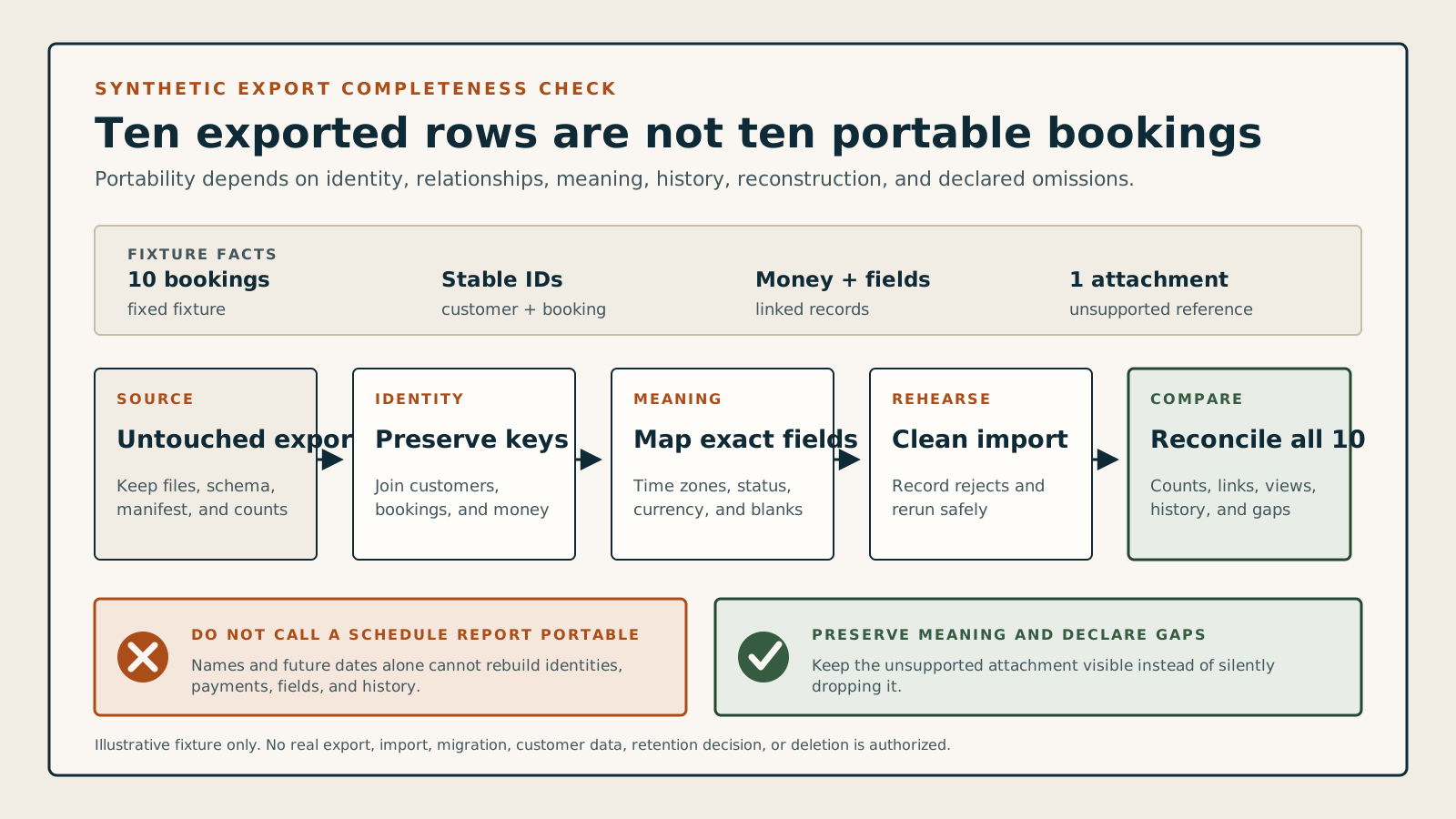
Use ten synthetic bookings with linked customers, money, custom fields, and history.
A fair portability test needs enough variation to expose broken IDs and lost meaning without touching real customers. The source and destination should reconcile from untouched files through a repeatable mapping.
- Create synthetic records for repeat customers, one guest, staff and location changes, a recurring link, cancellation, reschedule, no-show, deposit, refund, Unicode name, custom field, note, and one unsupported attachment reference.
- Export the approved package, preserve untouched originals and hashes, inspect schema and encoding, map every field, quarantine deliberate errors, and import into an authorized clean test destination.
- Compare counts, stable IDs, relationships, exact instants, statuses, money, custom fields, history, customer and staff views, rejected rows, rerun behavior, rollback, and the separate source-disposal decision.
Keep the test fair
- Use synthetic people, bookings, contacts, payments, notes, forms, messages, and files until access, privacy, security, migration-write, retention, and deletion authorization is explicit.
- Record product, plan, roles, export route, filters, snapshot time, files, schema, encoding, counts, hashes, transformations, destination version, import results, exceptions, and every limitation.
- Treat this checker and documentation as preparation, not evidence that a named product exports complete data, supports migration, restores backups, or satisfies ownership, privacy, security, accounting, or legal requirements.