 Booking Handbook
Add booking without breaking the journey.
First checks
- Draw the complete customer path
Map the entry page, service or provider choice, date and time, customer details, payment or deposit, confirmation, account or guest state, return URL, cancellation, rescheduling, and error recovery.
- Choose the delivery boundary
Decide whether customers use a hosted page, link, widget, iframe, WordPress block or shortcode, locally rendered plugin form, or an API-built interface. Record who owns layout, code, data, updates, and support.
- Set a loading and fallback contract
Reserve useful page space, show a clear loading state, time out visibly, prevent duplicate initialization, and keep a direct booking link that remains keyboard and touch accessible.
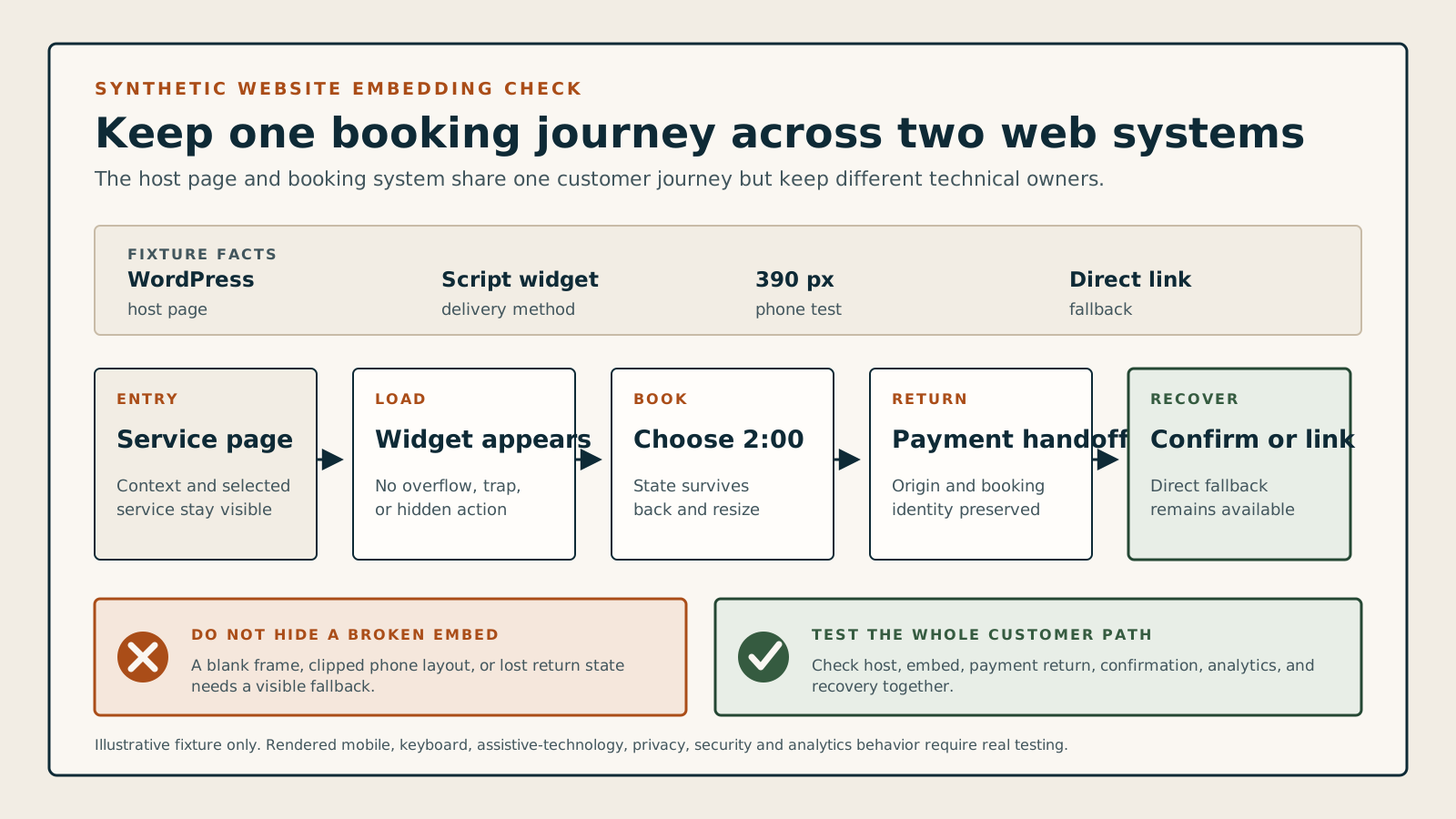
Does this delivery method fit the website and operating capacity?
Choose the site environment, delivery method, third-party embed policy, design-control need, measurement need, maintenance capacity, and fallback state. The checker identifies a test-ready path, a boundary to review, a missing fallback, an incompatible setup, or an engineering burden.
Review the method boundaries
The method can enter a controlled test, but its ownership, styling, measurement, policy, or maintenance boundary still needs review.
Test the exact builder, WordPress stack, or custom application that will surround the booking journey.
Record who owns the page, form code, layout, customer data, updates, errors, and support path.
Review origins, scripts or frames, permissions, security policy, consent behavior, data flow, and failure handling.
Declare which steps can be observed on each domain and where consent, identity, and event deduplication apply.
Assign version tracking, staging, regression testing, incident response, rollback, and vendor escalation.
Keep a clear direct booking route when the embedded or custom experience cannot load or complete.
Understand the delivery rule
Start with the journey
Decide where customers enter, book, pay, return, and recover from an error.
Name the boundary
Know which page, code, data, accessibility, and support layer the business actually controls.
Test the surrounding site
Check themes, cache, consent, mobile layout, navigation, payment return, and updates together.
Keep a fallback
Provide a usable direct booking route when the embedded experience cannot load or complete.
The booking system and the surrounding website share one customer experience.
A shortcode can render nothing, a sticky header can cover the next step, an iframe can lose its scroll bar, a cache can serve a blank schedule, or a payment return can strand the customer on another domain. The correct method is the one whose ownership, limitations, and recovery path match the business.
The delivery rule: Reliable website booking = suitable delivery method + complete journey + responsive layout + accessible controls + measured handoff + update recovery
A WordPress site loads a booking widget correctly on desktop, but its script is delayed by an optimization plugin and the form never appears on mobile. The direct booking page still works. The safe response is to preserve the fallback, isolate the conflicting optimization, and retest the whole path before restoring the embed.
Follow the complete website-booking sequence
The customer experiences the host page and booking journey as one path. Loading, navigation, payment return, confirmation, accessibility, analytics, and recovery need named owners even when different systems provide them.
- Draw the complete customer path
Map the entry page, service or provider choice, date and time, customer details, payment or deposit, confirmation, account or guest state, return URL, cancellation, rescheduling, and error recovery.
- Choose the delivery boundary
Decide whether customers use a hosted page, link, widget, iframe, WordPress block or shortcode, locally rendered plugin form, or an API-built interface. Record who owns layout, code, data, updates, and support.
- Set a loading and fallback contract
Reserve useful page space, show a clear loading state, time out visibly, prevent duplicate initialization, and keep a direct booking link that remains keyboard and touch accessible.
- Integrate without breaking the host page
Scope styles, load scripts once, preserve focus and browser history, declare iframe permissions, handle height and scrolling, and keep cache, optimization, consent, translation, and security rules explicit.
- Measure the handoffs honestly
Define which page views, form steps, errors, payments, confirmations, and returns can be observed on each domain. Deduplicate events and collect only approved data after consent rules apply.
- Retest every material change
Repeat the complete journey after theme, plugin, booking-product, browser, consent, cache, payment, domain, localization, or API changes; keep rollback and incident ownership documented.
Compare seven website delivery models
A hosted page, button, widget, iframe, WordPress block, plugin form, and API interface offer different control and create different maintenance work.
Hosted booking page
Example: the business shares a provider-hosted booking URL with no website embed.
- Rule
- Use it as the simplest standalone route and as the recovery destination for more complex embeds.
- Watch for
- Brand, navigation, analytics, domain continuity, consent, and layout control may be limited or split across systems.
Link or booking button
Example: a clear Book now control opens the hosted booking journey in the same tab or a declared new tab.
- Rule
- Preserve context, destination clarity, focus, return behavior, campaign parameters, and a stable direct URL.
- Watch for
- A popup-only or script-only button can fail silently, confuse browser history, or block keyboard and assistive-technology users.
Script widget
Example: a vendor script inserts an inline form or modal into a prepared container.
- Rule
- Load one approved version once, give its container a stable identity, expose loading and failure states, and prevent duplicate initialization after navigation.
- Watch for
- Consent tools, script optimizers, ad blockers, strict security policies, theme JavaScript, and repeated route mounts can stop or duplicate the widget.
Iframe embed
Example: a hosted booking page appears inside a frame on the business website.
- Rule
- Set a meaningful title, responsive dimensions, permitted features, focus and scroll behavior, loading fallback, and safe cross-origin communication where supported.
- Watch for
- Cross-origin rules can limit resizing, analytics, autofill, accessibility fixes, payment behavior, and error visibility from the host page.
WordPress block or shortcode
Example: an editor places a booking block or shortcode inside a page template.
- Rule
- Test the exact editor, theme template, page builder, caching path, user role, locale, and front-end route used in production.
- Watch for
- A shortcode appearing in the editor does not prove its scripts, styles, permissions, or dynamic data survive the rendered page and cache.
Plugin-rendered booking form
Example: the scheduling plugin stores and renders the booking journey inside WordPress.
- Rule
- Treat WordPress core, PHP, database, theme, plugin, add-on, mail, payment, cache, backup, and security updates as one maintained application stack.
- Watch for
- Greater local control also creates update, conflict, performance, backup, security, data-export, and incident-response responsibility.
API-built experience
Example: a custom interface reads availability and creates bookings through supported APIs.
- Rule
- Own validation, authentication, rate limits, retries, idempotency, errors, accessibility, localization, observability, versioning, and every customer-facing state.
- Watch for
- A custom front end is an ongoing software product, not a one-time design task or a shortcut around product limitations.
Follow the host-to-booking handoff lifecycle
Follow one identity and one customer journey from the host page into booking, through payment or confirmation, back to a useful final state, and into recovery when something fails.
- Choose and declare the route
Host website: Tell the customer whether booking opens on this page, in a frame or popup, or on a separate hosted page. Keep the destination and a direct fallback understandable before navigation begins.
- Place and initialize once
Host and booking provider: Reserve the container, load the supported code once, apply consent and security rules, expose pending and timeout states, and prevent duplicate mounts after navigation or cache restoration.
- Complete the booking interaction
Booking provider, with host-page support: Keep service, time, customer details, validation, focus, scroll, browser history, mobile layout, and duplicate-submission protection usable across every step.
- Hand off payment or confirmation
Booking, payment, and confirmation systems: Preserve one booking identity and make pending, failed, paid, booked, and duplicate states distinguishable when the journey crosses another page, frame, or domain.
- Return and measure honestly
Host, provider, and measurement owner: Return the customer to a useful final state, show what happened, and record only the events each system can observe after consent without inventing cross-domain continuity.
- Recover and retest after change
Named site operator: Show the direct fallback, capture the failing versions and state, roll back where needed, reconcile the final booking and payment outcome, and repeat the same journey after material changes.
Review host-page changes and recovery
Theme, cache, component, domain, consent, and failure changes can break different parts of the path. Preserve versions and evidence so recovery does not depend on guessing.
The theme or page builder changes
Retest layout, focus, and controlsCheck scoped styles, sticky headers, overlays, stacking, scroll, form steps, validation, browser history, reduced motion, and keyboard order on every target viewport.
Cache, CDN, or optimization changes
Retest dynamic loadingVerify script order, deferral, minification, stale markup, consent timing, logged-in versus public cache, invalidation, and the direct fallback without clearing evidence prematurely.
WordPress, PHP, plugin, or add-on updates
Use staging and a rollback pointRecord versions, database changes, backup and restore readiness, deprecated APIs, shortcode output, payments, mail, and the full customer path before production rollout.
The booking domain or return path changes
Recheck every handoffUpdate trusted origins, content-security rules, cookies, campaign parameters, payment returns, confirmation pages, browser history, deep links, and redirects without creating loops.
Consent or analytics rules change
Fail closed for optional trackingKeep core booking usable where allowed, prevent duplicate or premature events, declare cross-domain loss, minimize fields, and retest consent withdrawal and regional behavior.
The embedded journey fails
Show a usable recovery routePreserve entered data only where safely supported, explain the failure, prevent duplicate bookings or payments, offer the approved direct route, and give staff an incident record.
Look for warning signs in a software demo
Test phone width, keyboard use, slow or blocked loading, validation, payment return, browser navigation, consent, cache, an update, duplicate submission, and the direct fallback.
Use one synthetic service, one phone-sized viewport, and one forced loading failure.
A rendered first step is not enough. A fair test follows the customer into the form, through validation and payment boundaries, back to confirmation, and then through cancellation or rescheduling after the surrounding website changes.
- In an explicitly authorized staging environment, add one synthetic booking path with a visible direct-link fallback and record the site, method, versions, domains, cache, consent, locale, and expected handoffs.
- Complete the journey by keyboard and touch at desktop and phone widths; test loading, field validation, date selection, payment boundary, confirmation, back navigation, refresh, duplicate submission, return URL, cancellation, and rescheduling.
- Block or delay the embed, change one theme or cache setting, and update one component; verify the failure message, fallback, incident evidence, rollback, analytics limits, and restored end-to-end journey.
Keep the test fair
- Use synthetic customers, contact details, services, appointments, and test-mode payment data only after staging and write authorization is explicit.
- Record exact versions, page template, embed code or configuration, domains, permissions, consent state, viewport, browser, events, errors, timestamps, and every limitation.
- Treat this checker and documentation as preparation, not evidence that a named product or method is accessible, compatible, compliant, secure, fast, measurable, or suitable for production.