 Booking Handbook
Make the booking form easier to finish.
First checks
- Orient the customer
State the business, booking purpose, current step, expected time, required versus optional information, guest or account path, language, support route, and what will happen before anything is submitted.
- Preserve service context
Keep the chosen service, provider preference, location or remote mode, duration, party size, price basis, deposit or pay-later boundary, and any preselected deep-link context visible and editable where allowed.
- Explain date and availability
Show the relevant time zone, selected date, available and unavailable states, loading and empty states, notice and horizon rules, duration, alternatives, and what happens if availability changes before confirmation.
Can a first-time customer understand, complete, and recover from this booking path?
Describe the entry context, preserved choices, availability explanation, responsive layout, keyboard and focus result, validation, submission protection, final confirmation, and staffed fallback. The checker identifies the next safe test priority without observing a real customer.
Essential interaction checks remain
The described journey has no immediate blocker, but essential interaction or duplicate-protection behavior still needs a controlled test.
Show the business, purpose, selected context, current step, language, support route, and what happens before submission.
Preserve service, provider, location, party size, date, and other permitted choices through steps, validation, sign-in, payment, and Back.
Explain date, time zone, available and unavailable states, duration, loading, empty results, alternatives, and changes before confirmation.
Keep every step, field, summary, error, price, policy, and action visible and operable at phone width, zoom, and text spacing.
Complete a keyboard-only walkthrough and qualified assistive-technology testing before making an accessibility claim.
Associate plain-language errors with fields, preserve safe progress, expose system failures, and prevent duplicate requests, bookings, and charges.
Return one explicit final state, reference, complete details, next actions, and a staffed route when the digital journey cannot finish.
Understand the journey rule
Keep context visible
Preserve service, provider, location, date, time zone, duration, price, and policy as the customer moves.
Make choices understandable
Explain availability, unavailable states, required fields, validation, and what the next action will do.
Support different input methods
Maintain reading order, labels, focus, keyboard operation, touch targets, zoom, and error announcements.
Recover without duplication
Preserve safe progress, refresh changing availability, block repeated submission, and return a clear final state.
The journey fails when the customer loses context, control, or a trustworthy result.
A time slot can look available without explaining its time zone, a dedicated provider link can forget the provider, the Next button can do nothing, mobile layout can hide a step, or an API failure can empty the form without telling the customer what happened. Usability includes the failure path and the final receipt, not just the first screen.
The journey rule: Usable booking journey = clear context + understandable choices + valid availability + accessible interaction + safe submission + explicit confirmation + recoverable failure
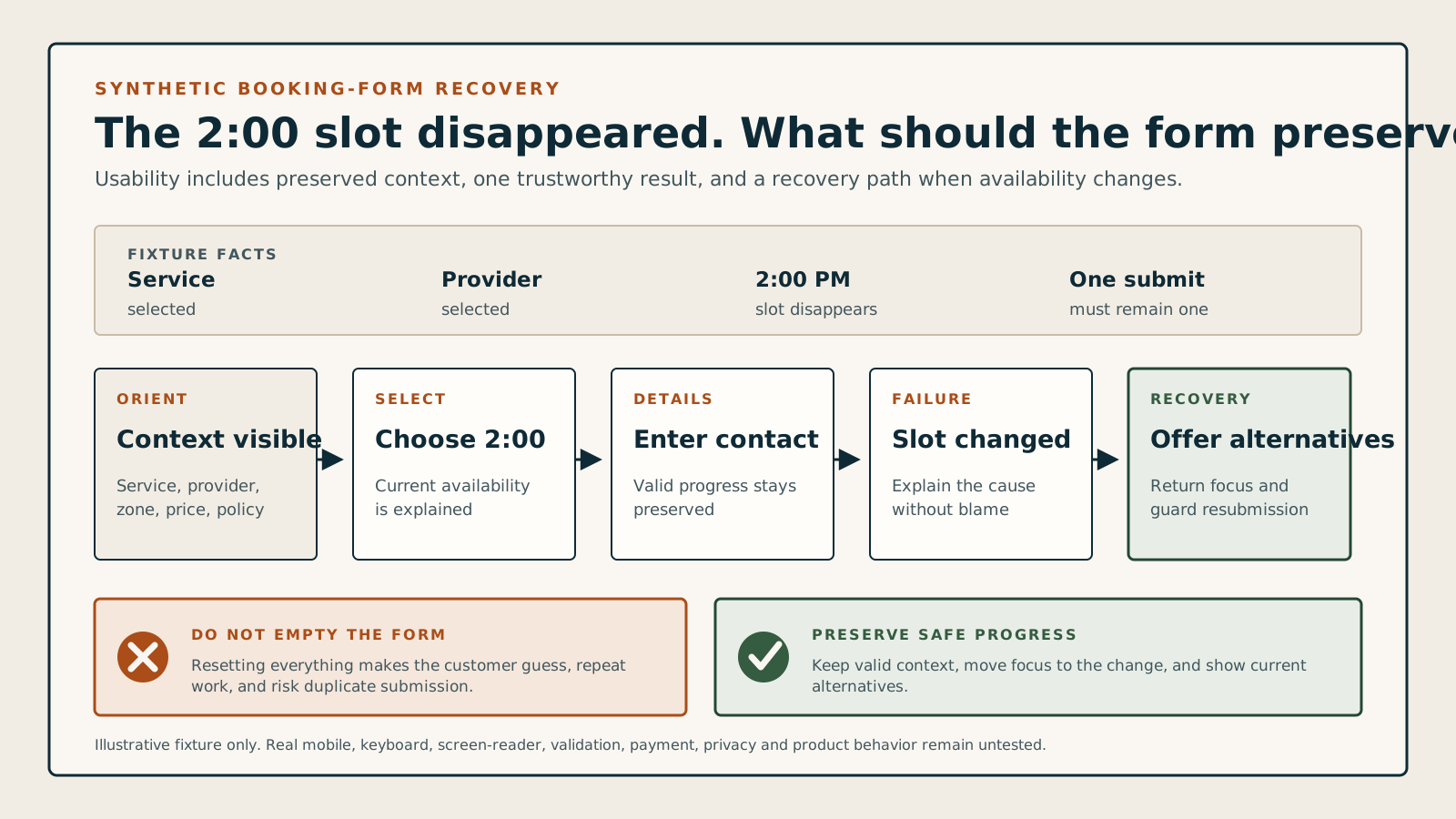
A customer chooses a service and provider, selects 2:00 PM, enters contact details, then receives a generic error. The form resets and 2:00 PM disappears. A safer journey preserves non-sensitive progress, explains that the slot changed, returns focus to the time step, offers valid alternatives, and prevents a second charge or duplicate booking.
Follow the complete customer-booking sequence
The form must preserve what the customer chose, explain what changed, prevent duplicate work, and return one trustworthy result across screen sizes and input methods.
- Orient the customer
State the business, booking purpose, current step, expected time, required versus optional information, guest or account path, language, support route, and what will happen before anything is submitted.
- Preserve service context
Keep the chosen service, provider preference, location or remote mode, duration, party size, price basis, deposit or pay-later boundary, and any preselected deep-link context visible and editable where allowed.
- Explain date and availability
Show the relevant time zone, selected date, available and unavailable states, loading and empty states, notice and horizon rules, duration, alternatives, and what happens if availability changes before confirmation.
- Collect only required details
Use persistent labels, clear instructions, appropriate field types and autocomplete, visible required states, grouped choices, plain-language validation, consent boundaries, and safe preservation of non-sensitive progress.
- Review and submit once
Present the complete appointment, price, payment consequence, policy, customer details, edit routes, and final action; then lock or identify the request so double taps, retries, refreshes, and slow responses cannot duplicate it.
- Confirm or recover explicitly
Return one clear pending, confirmed, waitlisted, failed, or changed state with a booking reference, complete details, next steps, receipt or payment status, calendar and message boundaries, self-service routes, and a staffed fallback.
Compare five customer journey models
Preselected links, multi-step forms, single pages, booking requests, and returning-customer portals need different wording, state preservation, and recovery checks.
Direct preselected journey
Example: a service, provider, location, or campaign link opens with valid context already selected.
- Rule
- Announce and show the preselected values, let the customer change only what is allowed, and preserve them through back navigation, validation, sign-in, payment, and confirmation.
- Watch for
- A dedicated link that silently loses its provider or service can confirm a different appointment from the one the customer expected.
Guided multi-step form
Example: the customer completes service, staff, date, details, and review in separate steps.
- Rule
- Name the current step and total, preserve completed choices, support Back without data loss, move focus deliberately, and keep a readable summary available.
- Watch for
- A progress indicator can look complete while hidden validation, an unavailable earlier choice, or a broken Next control traps the customer.
Single-page booking form
Example: the service, calendar, fields, price, and submit action appear on one responsive page.
- Rule
- Maintain a logical reading and focus order, group sections, update dependent content without unexpected jumps, and summarize errors at the top while linking to each field.
- Watch for
- Long pages can hide errors, price changes, calendars, sticky controls, or the final action on small screens and at high zoom.
Request-to-book flow
Example: the customer proposes a time and staff later accepts, changes, or declines the request.
- Rule
- Call the action a request, show the response window and interim state, prevent premature calendar certainty, and provide the eventual acceptance, alternative, or decline path.
- Watch for
- Using Confirmed language for a pending request can make a customer arrive or pay for an appointment the business never accepted.
Returning customer or portal flow
Example: a customer signs in to reuse details, book again, or manage existing appointments.
- Rule
- Keep guest and recovery options clear, protect sensitive data, preserve the intended booking after authentication, and distinguish a new booking from changing an existing one.
- Watch for
- Forced account creation, failed password recovery, stale stored details, or an ambiguous Book again control can block or duplicate the task.
Review customer-journey changes and failures
Back, refresh, availability, validation, payment, locale, time-zone, timeout, and connection changes can each create a different failure. Test the recovery, not only the alert.
The customer goes Back or refreshes
Preserve safe context deliberatelyKeep allowed selections and non-sensitive progress, revalidate availability and price, restore focus and step state, and avoid resubmitting a prior request from browser history.
The selected slot becomes unavailable
Explain and return to alternativesDo not blame the customer or reset the entire form. State that availability changed, preserve other valid choices, move focus to the message, and show current alternatives in the correct zone.
A field fails validation
Show what, where, and how to fixKeep entered values where safe, associate the error with its field, summarize multiple errors, use plain language, announce the change, and never rely on color, placeholders, or disappearing text alone.
Payment is slow, declined, or uncertain
Keep booking and money states explicitPrevent repeated charges and bookings, show whether the slot is held, preserve the provider reference, separate decline from unknown, and provide a safe retry or staffed recovery route.
Language, locale, or time zone changes
Re-render meaning, not only labelsRecheck dates, times, daylight rules, week start, number and currency format, translated dynamic strings, field order, text expansion, policies, errors, and confirmation details.
The session times out or connection drops
Return one trustworthy stateExplain what was saved, whether a booking or payment exists, how to check by reference, which data must be re-entered, and how to continue without creating a duplicate.
Look for warning signs in a software demo
Force the customer to recover, not just complete. Watch availability labels, selected context, mobile layout, zoom, keyboard focus, validation, slow submission, duplicate activation, payment uncertainty, confirmation details, browser history, and the staffed fallback.
Use one synthetic customer, one changing slot, and three input paths.
A fair UX test completes the same controlled task on desktop, phone width, and keyboard-only input, then forces validation, availability, timeout, and duplicate-submission failures without using a real customer or payment.
- Define a synthetic service, optional provider, location or remote mode, local time zone, fixed price or payment boundary, required fields, policy, success state, and staffed fallback; record the expected path and every preselected value.
- Complete the journey with mouse or touch, keyboard only, and an approved screen-reader test when qualified support is available; inspect reading order, labels, focus, zoom, step changes, summaries, errors, loading, Back, refresh, and confirmation.
- Make the selected slot disappear, submit twice, trigger one field error, one silent-network-style failure, and one timeout; verify preserved context, no duplicate booking or charge, current alternatives, final reference, recovery, and staff evidence.
Keep the test fair
- Use synthetic customers, contacts, services, appointments, form answers, and test-mode payment data only after staging, accessibility-test, booking-write, and payment authorization is explicit.
- Record exact product, plan, route, viewport, zoom, browser, input method, assistive technology when used, language, zone, settings, steps, timestamps, errors, focus behavior, result, and every limitation.
- Treat this checker and documentation as preparation, not evidence that a named product is usable, accessible, conformant, fast, secure, private, localized correctly, or better converting.