 Booking Handbook
Keep booking and payment records in sync.
First checks
- Define the integration contract
Name the booking, checkout, gateway, POS, invoice, receipt, refund, accounting, and export systems; record which one owns each state and which current support or geographic source applies.
- Create the identity map
Assign durable references for the booking, obligation, order or invoice, payment attempt, successful transaction, refund, event, and receipt before exchanging status.
- Translate every state
Map initialized, pending, authorized, captured, succeeded, failed, cancelled, voided, refunded, booked, and missing states without treating unlike labels as equivalent.
Do the booking and money systems describe one final outcome?
Choose a synthetic integration model and the current support, geographic, identity, payment, booking, commerce, webhook, retry, and reconciliation states. The checker identifies an incompatible route, missing contract, duplicate risk, unresolved mismatch, or a fixture ready for rehearsal.
The systems do not yet agree
At least two systems disagree about the same synthetic obligation or outcome. Reconcile the first divergence before continuing.
Do not treat payment success as booking confirmation; recover or reverse the unmatched state under the declared policy.
Understand the integration rule
Verify the route
Check current gateway, seller-country, currency, payment-method, plan, and settlement boundaries.
Map stable identities
Link the booking, checkout or order, payment attempt, transaction, refund, invoice, receipt, and event.
Translate states
Keep pending, authorized, captured, failed, cancelled, refunded, and confirmed meanings distinct across systems.
Reconcile after change
Make retries, webhooks, POS actions, refunds, and offline corrections converge without duplicate actions.
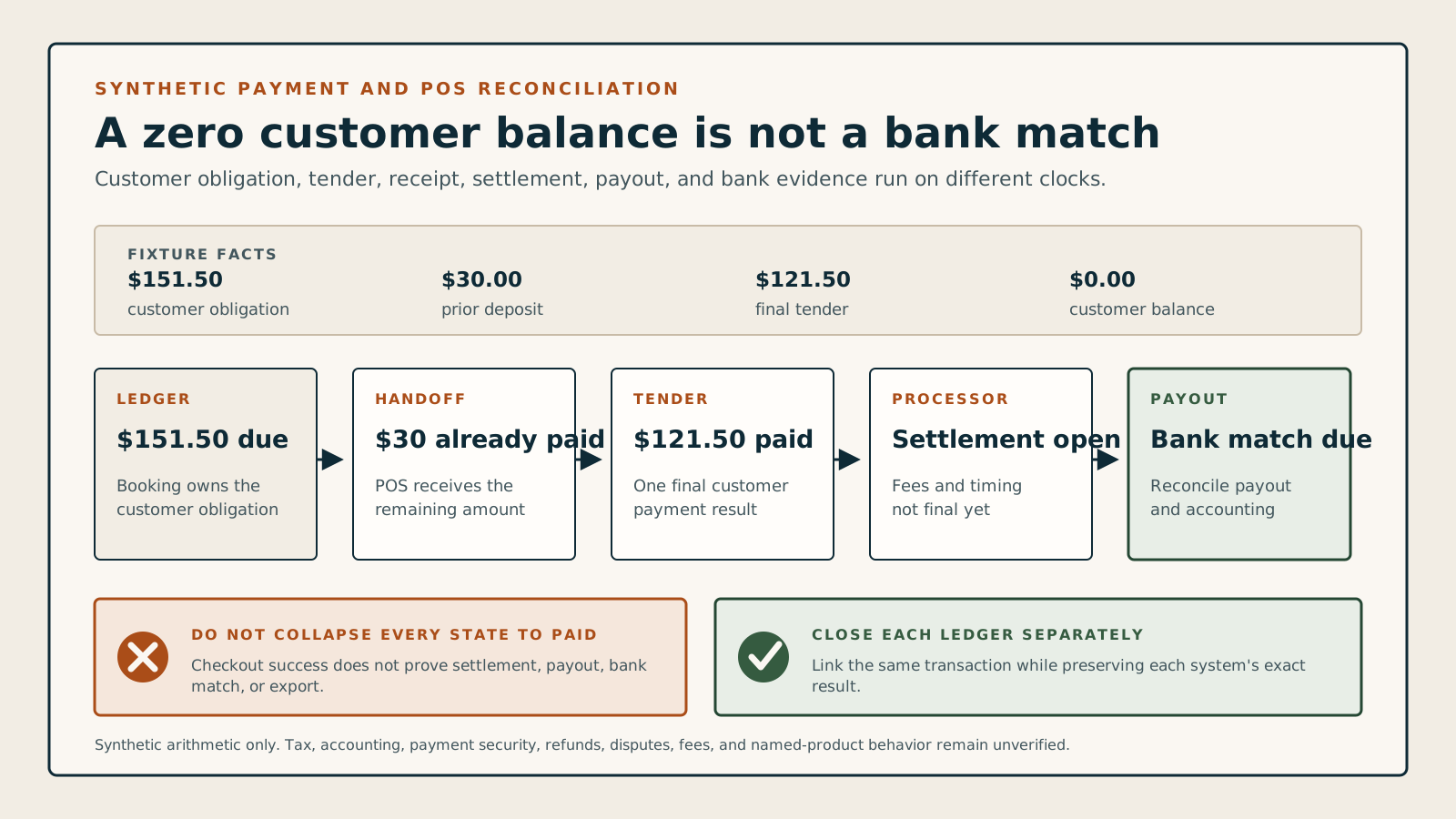
One customer action can create several records with different clocks.
The browser may return before an asynchronous payment settles, a webhook may arrive late or twice, a POS sale may originate outside the booking flow, and an invoice or refund may change after the appointment record was written. The integration needs durable identities, explicit status translation, replay-safe handlers, and a final reconciliation check.
The integration rule: Reliable integration = stable identity map + explicit state translation + safe retries + final reconciliation
PAYMENT-A reports succeeded, but BOOKING-A is missing and ORDER-A remains pending. The correct response is not to charge again or invent confirmation. Preserve the first operation, retrieve the authoritative records, repair or reverse the unmatched edge, and record the final outcome.
Follow the complete payment-integration sequence
The money rule is defined elsewhere. This sequence follows its result across booking, checkout, gateway, point of sale, invoice, receipt, refund, export, and incident records.
- Define the integration contract
Name the booking, checkout, gateway, POS, invoice, receipt, refund, accounting, and export systems; record which one owns each state and which current support or geographic source applies.
- Create the identity map
Assign durable references for the booking, obligation, order or invoice, payment attempt, successful transaction, refund, event, and receipt before exchanging status.
- Translate every state
Map initialized, pending, authorized, captured, succeeded, failed, cancelled, voided, refunded, booked, and missing states without treating unlike labels as equivalent.
- Make commands and events replay-safe
Reuse one logical operation key for uncertain retries, verify incoming events, record processed event identities, and expect delayed, repeated, or out-of-order delivery.
- Project changes across systems
Carry booking edits, checkout actions, offline POS payments, invoice updates, discounts, tax or tip outputs, voids, refunds, and failures to every dependent record without overwriting history.
- Reconcile and recover
Compare booking, payment, order, POS, invoice, refund, receipt, export, and incident records; close only when the final state agrees or a named limitation remains visible.
Compare six integration models
Booking-led, commerce-led, gateway-led, point-of-sale-led, invoice-led, and custom event routes have different authoritative states and recovery burdens.
Booking-led collection
The scheduler creates the obligation and starts payment.
- Rule
- Keep the booking reference attached through checkout, transaction, refund, receipt, and return.
- Watch for
- A successful charge can remain unmatched when booking creation or confirmation fails afterward.
Checkout or order-led collection
A commerce order owns line items and the booking is created or updated after payment.
- Rule
- Preserve one order version, booking reference, payment state, and explicit fulfillment trigger.
- Watch for
- An order status is not automatically the same as a confirmed appointment or completed service.
Gateway-led collection
A payment link or hosted checkout reports the result back to the booking system.
- Rule
- Use server-side state retrieval or authenticated events and reconcile the browser return separately.
- Watch for
- A return page can be closed, repeated, forged, or reached before final payment state.
POS-led checkout
Staff collect deposits, balances, tips, or refunds at a counter or terminal.
- Rule
- Carry the booking and obligation reference into the POS transaction and project the final transaction back.
- Watch for
- Staff may charge full price, miss an online payment, or create an unlinked refund when systems do not share state.
Invoice-led collection
An invoice is issued before or after the appointment and can be paid asynchronously.
- Rule
- Link invoice, booking, payment, refund, receipt, and current obligation while preserving their separate statuses.
- Watch for
- Issued, sent, due, paid, void, and refunded invoice states can drift from the booking.
Custom API or event-led integration
Custom code maps commands and events between booking, commerce, gateway, and internal systems.
- Rule
- Own authentication, versioning, idempotency, ordering, replay, observability, dead-letter recovery, and reconciliation.
- Watch for
- A webhook receiver or copied integration snippet is an ongoing operated system, not a one-time connection.
Follow the payment-to-booking handoff lifecycle
Each step has a different authoritative owner. Preserve the shared identities while commands, events, offline actions, and later changes move at different speeds.
- Create the obligation
Booking and money-rule owner: Create BOOKING-A and OBLIGATION-A with currency and links to the price, deposit, discount, tax, tip, invoice, and refund policies owned elsewhere.
- Initialize checkout
Booking, commerce, or gateway: Create ORDER-A or INVOICE-A and ATTEMPT-A once; preserve the logical operation key, amount, currency, and booking reference.
- Record the payment result
Gateway or POS: Distinguish pending, authorized, captured, succeeded, failed, cancelled, voided, and refunded outcomes; do not infer settlement from navigation.
- Project the result
Integration boundary: Update the booking, order, invoice, receipt, staff checkout, and customer view from the authoritative result without duplicating the transaction.
- Propagate later changes
Change and integration owners: Carry reschedules, cancellations, price changes, offline POS actions, retries, disputes, voids, and refunds as linked events rather than replacements.
- Reconcile and recover
Named operator: Retrieve final records, compare identities and states, repair the first broken edge, preserve the incident, and close only one explainable outcome.
Review connected-state changes
Pending payments, duplicate events, point-of-sale-originating actions, booking edits, refunds, and geographic changes each need an explicit propagation and recovery rule.
The payment remains pending
Keep confirmation conditionalPreserve the attempt and booking state, retrieve authoritative status, and avoid both premature fulfillment and a second charge.
The webhook arrives twice or out of order
Replay without repeating the business actionAuthenticate the event, use its stable identity, retrieve missing objects, and make duplicate or reordered delivery converge on the same state.
Staff collect money in the POS
Link the offline-originating transactionAttach the booking and obligation references, record the payment method and actor, and update the booking-side balance and receipt.
The booking changes after checkout
Preserve both historiesApply the policy-owned obligation change, then project the new remainder, overpayment, invoice, receipt, refund, and staff state without editing the old transaction.
A refund, void, or dispute appears
Reopen cross-system reconciliationLink the later event to the original payment and update net collected value, booking outcome, order or invoice, receipt, export, and incident record.
Gateway support or geography changes
Recheck the exact current routeVerify seller country, currency, payment method, settlement, product plan, integration version, and fallback before accepting another payment.
Look for warning signs in a software demo
Force missing confirmation, a timeout, a duplicate event, an offline point-of-sale payment, a later refund, and an unsupported route. Watch whether the system recovers without guessing or charging twice.
Make PAYMENT-A succeed while BOOKING-A is missing, then recover without charging twice.
A logo, installed plugin, or successful happy path is not enough. Use one fixed synthetic manifest to observe which system owns each state, how retries and events behave, and whether every record reaches one final answer.
- Create an offline test manifest with BOOKING-A, OBLIGATION-A, ORDER-A, ATTEMPT-A, PAYMENT-A, EVENT-A, INVOICE-A, RECEIPT-A, and REFUND-A; record expected state translations and stable links.
- In an explicitly authorized sandbox only, rehearse pending, failed, successful, duplicate, out-of-order, offline-POS, price-change, cancellation, void, and refund paths without real customers or payment methods.
- Compare the booking, customer view, staff checkout, gateway or POS, order or invoice, refund, receipt, export, and incident log; keep every mismatch and unavailable capability Unknown.
Keep the test fair
- Use only synthetic identities and documented test modes after account, integration, and write authorization is explicit.
- Record exact product, plan, seller country, currency, payment method, integration version, checked date, operation keys, event IDs, statuses, timestamps, and limitations.
- Treat this checker and guide as a product-neutral test plan, not evidence that a named product, gateway, POS, geography, tax rule, or integration is supported or suitable.